Blog
One API for Every Product: How OpsAPI Handles Sign-In, Workspaces and Business Modules
Why we stopped building a backend per product, with the diagrams and workflows from the OpsAPI project
Sur cette page
If you run more than one product, you probably run more than one backend. Each has its own login screen, user table, password reset, roles, admin pages and audit log, and each one is built, patched and secured separately. OpsAPI replaces them with one open-source API. It signs your users in once for every app, keeps each customer's data in its own workspace, and switches on only the business modules a product needs, from CRM and invoicing to a website CMS and UK tax filing. This post explains how it works, with the diagrams and workflows from the OpsAPI project. The product page is here, and the project lives at opsapi.org.
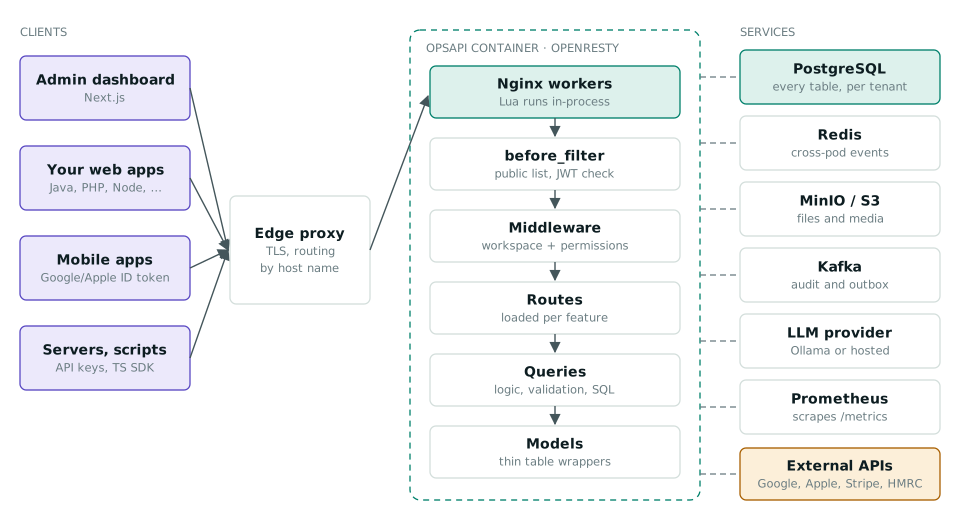
One container, one database. Redis, MinIO, Kafka and the model provider are optional: a minimal deployment needs only PostgreSQL.
The problem: one backend per product
Every new product starts the same way. Someone builds sign-in, then two-factor codes, then Google sign-in, then roles, then an invitation flow, then an admin screen. By the third product the team maintains three copies of the most security-sensitive code it owns, and a customer who uses two products has two passwords. OpsAPI's own blog puts the alternative plainly: "One API, many modules: why we stopped building a backend per product."
What OpsAPI gives every product
- One sign-in for every app. Email and password with lockout and rate limits, emailed two-factor codes, Google and Apple, SAML 2.0 single sign-on per workspace, and a hosted "Sign in with OpsAPI" page. An app checks who a user is with one call:
/auth/me. - Workspaces from the first table. Each customer is a workspace with its own members, roles, invitations, outgoing mail settings and AI model provider.
- 20 business modules, switched per deployment. CRM, invoicing, accounting, UK tax filing, bank transactions, timesheets, kanban, chat, push notifications, e-commerce, delivery, reviews, shop, billing, hospital and care, field service, academy, CMS, forms and hiring.
- Built to be run. One Docker image, a Helm chart, health probes, Prometheus metrics, Grafana dashboards, an audit trail and a catalogue of error codes.
One sign-in, many apps
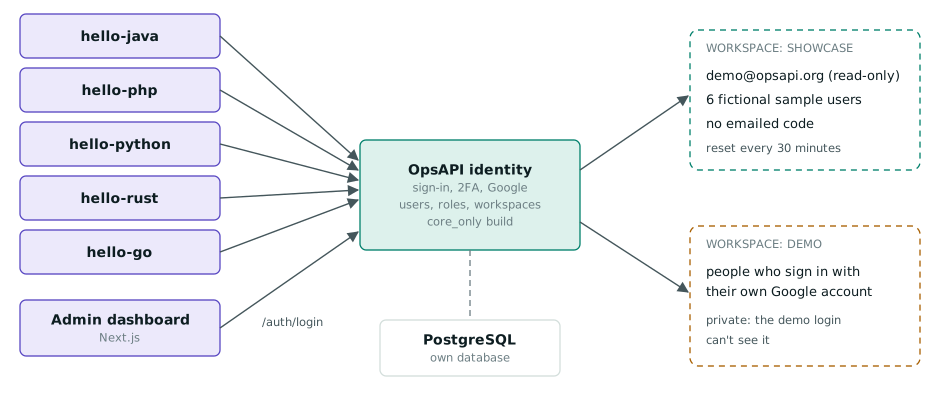
The OpsAPI live demo shows the idea working: five small apps written in Java, PHP, Python, Rust and Go, plus the admin dashboard, all sign in through one OpsAPI identity service.
Here is the workflow behind each "Log in" button. The app never sees a password. It sends the user to OpsAPI, gets a signed token back, checks that the nonce matches what it saved, and asks OpsAPI who the user is.
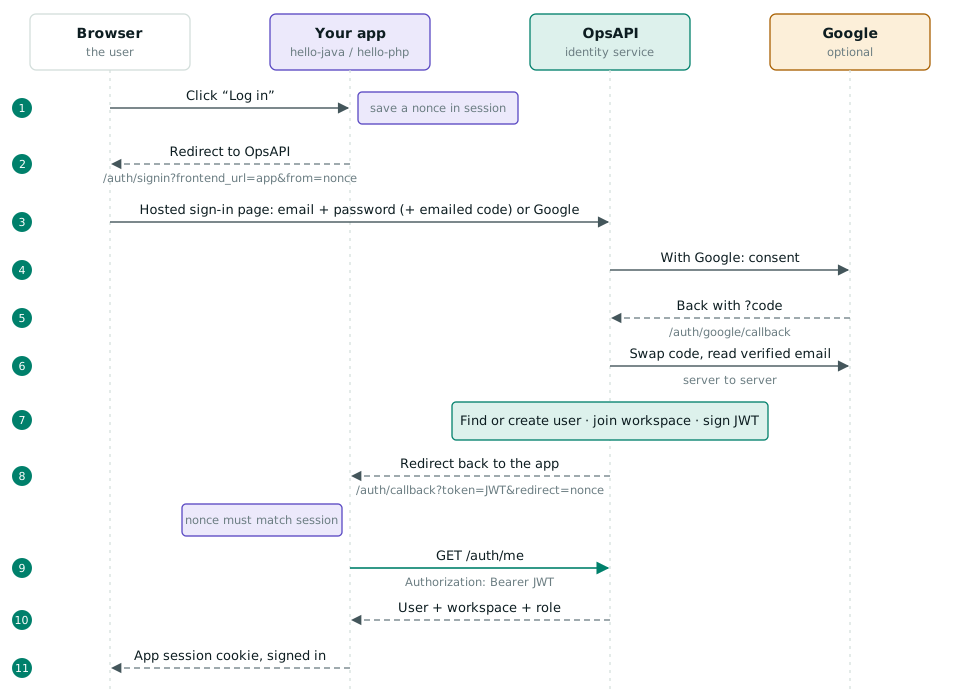
Solid arrows are requests; dashed arrows are redirects and responses.
Switch modules on, not off
A single setting, PROJECT_CODE, decides which modules a deployment loads. Presets such as business, ecommerce, cms, tax_copilot or core_only can be combined, for example ecommerce,collaboration. In OpsAPI's words: "A module that's switched off isn't hidden, it's absent: its addresses answer 'not found' for everyone and its database tables are never created." Less code is exposed, and there are fewer tables to back up and secure.
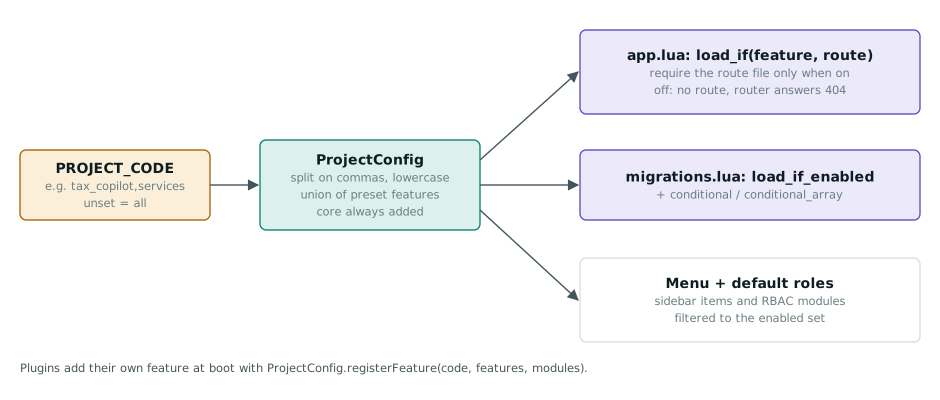
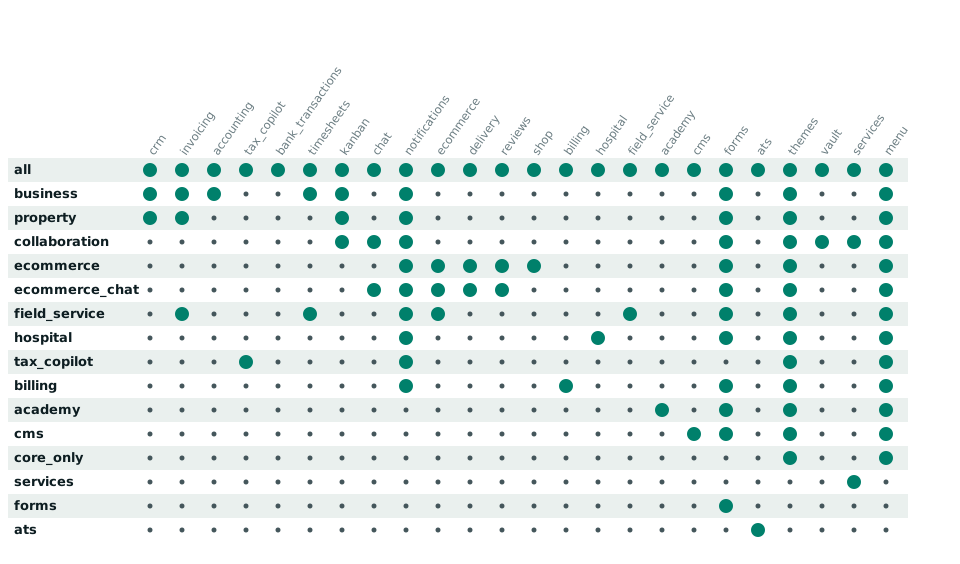
Every preset also includes the core: sign-in, users, workspaces, roles, API keys, webhooks, audit and plugins. Module sets are per deployment, not per workspace.
Keeping customers apart
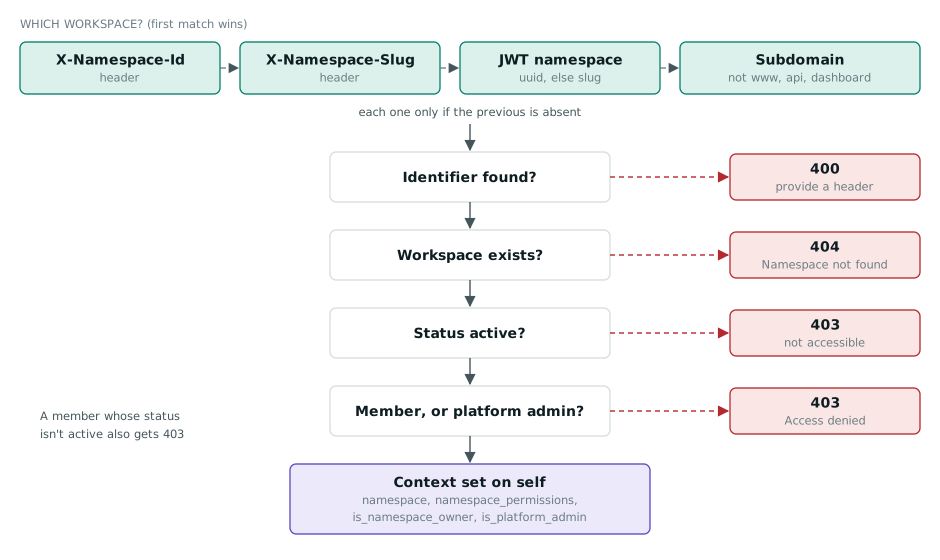
Multi-tenant software lives or dies on one question: can customer A ever see customer B's data? OpsAPI answers it on every request, before any module code runs. It works out the workspace from a header, the token or the subdomain, checks that the workspace exists and is active, and checks that the user is a member. Any failed check ends the request.
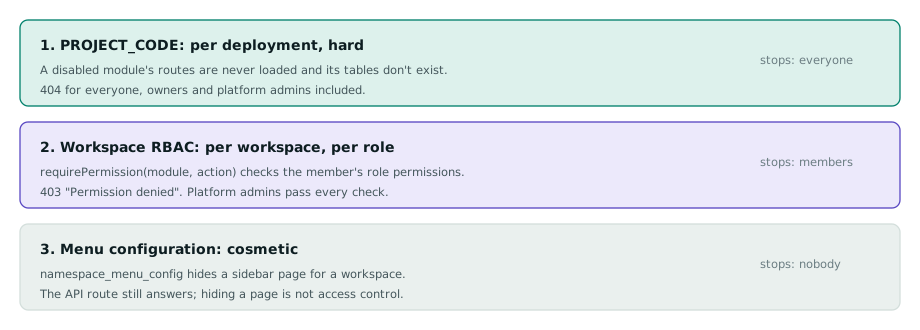
Access is layered. The module switch is a hard boundary for everyone. Workspace roles decide what each member may do, using module.action permissions. The menu configuration only tidies the dashboard; it is not a security control, and OpsAPI is explicit about that.
One request, end to end
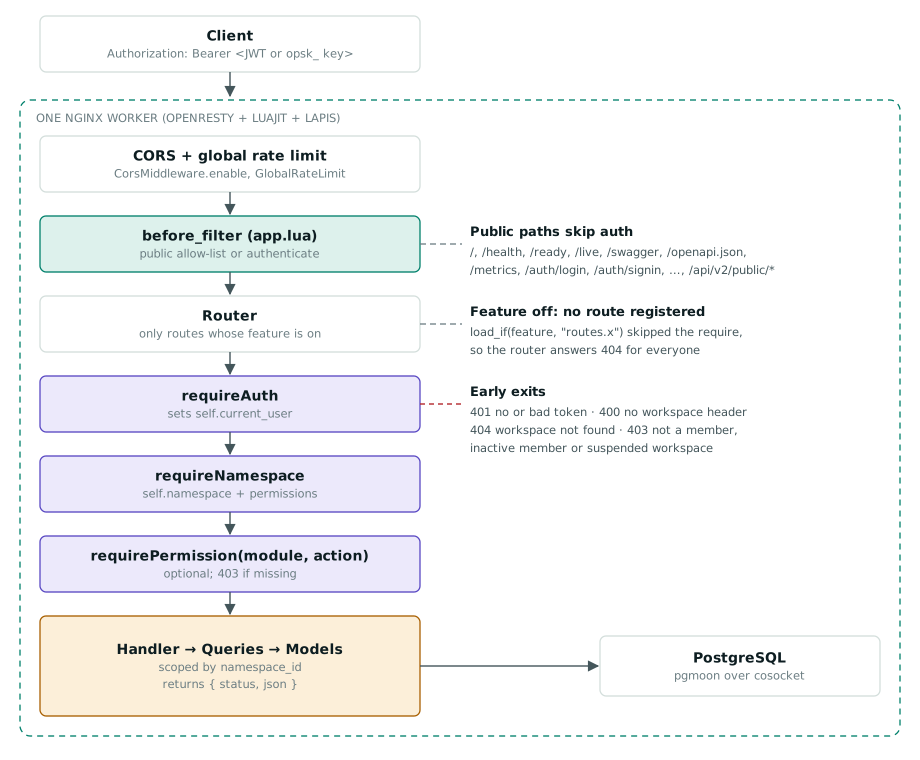
OpsAPI runs Lua inside the Nginx worker processes of OpenResty, using the Lapis framework, so a request never hops to a separate application server. Every request takes the same path, and each stage can end it early.
Workflows that reach your other systems
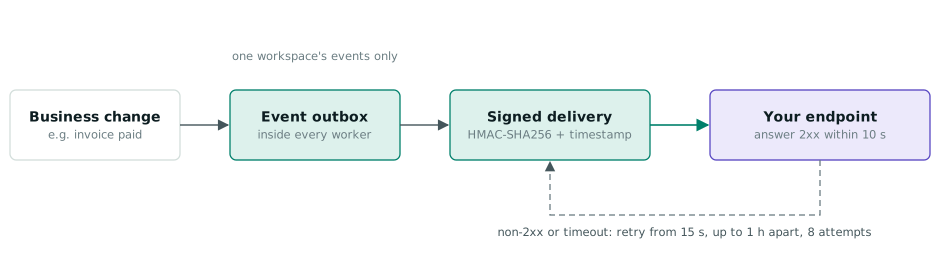
Workspaces can send their events, such as an invoice being paid, to their own URLs. Each delivery is signed with HMAC-SHA256 and a timestamp, and retried if your endpoint is down.
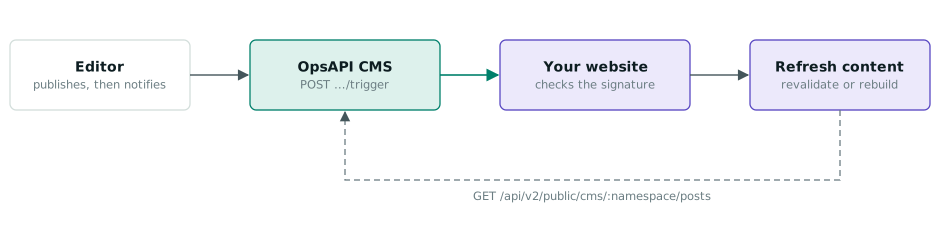
The same mechanism keeps a static website current. When an editor publishes a post in the OpsAPI CMS, a signed webhook tells the website to fetch the published posts again and rebuild. The TenthMatrix blog you are reading comes from the OpsAPI CMS in the same way: published posts are pulled in and the static site rebuilds.
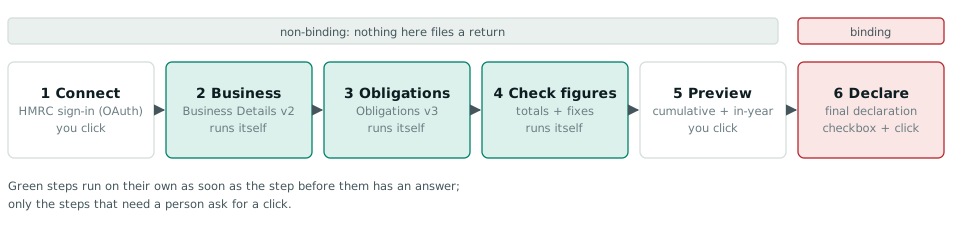
Modules can carry whole business workflows too. The UK tax filing module walks a user through Making Tax Digital in six steps. Steps two to four run on their own, and only the final declaration is binding. This is the engine behind our AI Tax Filing application for accountancy firms.
Extending it with plugins
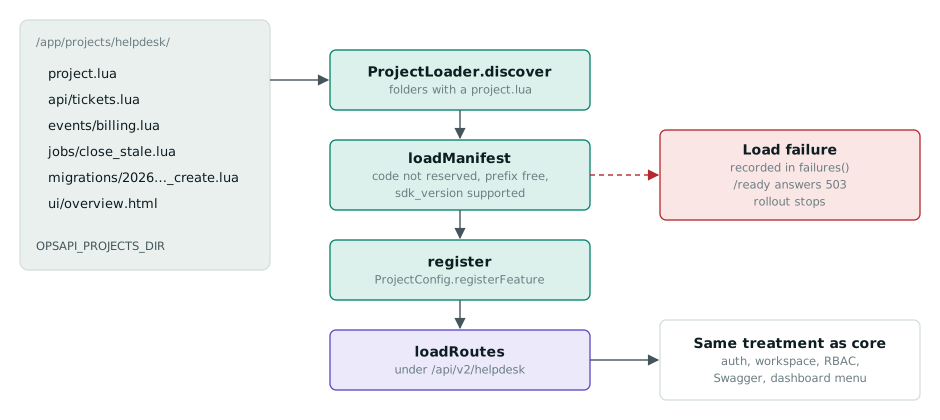
A plugin is a folder of Lua. OpsAPI discovers it when a worker starts, checks its manifest, registers its feature and mounts its routes, so the plugin gets sign-in, workspaces, permissions, Swagger docs and dashboard menu entries for free. A broken plugin never fails silently: the pod reports not ready and the rollout stops.
How it ships: the CI/CD workflow
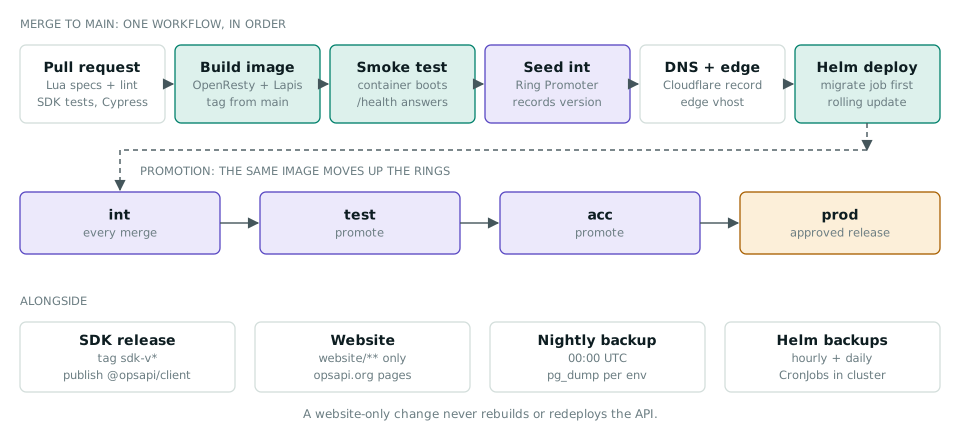
The OpsAPI repository runs one workflow on a merge to main, so nothing races. Pull requests run the Lua specs and lint, the SDK tests and the Cypress end-to-end tests. A merge builds the image, smoke-tests it, records the version in Ring Promoter for the int environment, makes sure DNS and the edge are ready, and rolls out with Helm. The same image is then promoted from int to test, acc and production. The SDK, the opsapi.org website and the backups each have their own workflow.
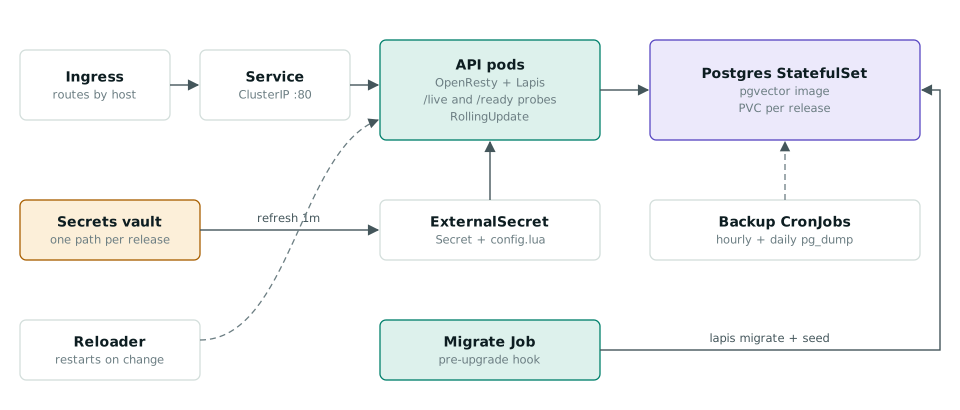
On Kubernetes, the Helm chart runs a migration job before each upgrade, syncs secrets from a vault, waits for new pods to report ready and drains the old ones gracefully.

AI in the platform
Several modules use AI: chat with an AI agent, AI-assisted categorisation in accounting, bank statement extraction and classification for tax, AI first-round interviews in hiring, and RAG-backed chat in the shop. Each workspace can bring its own model provider, including a local model through Ollama, so sensitive data can stay on your own hardware. The repository also includes an MCP server, so Claude Code, Cursor or another MCP-capable agent can manage kanban tasks and website content with a personal API key, with every change logged as that user.
The honest trade-offs
- You run it. OpsAPI is open source and self-hosted, so there is no per-user fee, but you run PostgreSQL, take its backups, upgrade OpsAPI and monitor it.
- Modules are per deployment. If two customers need different module sets, they need different deployments.
- Lua is less common. Calling OpsAPI needs only HTTP and there is a TypeScript SDK, but writing a plugin means writing Lua.
- Keep the admin side private. OpsAPI's own guidance is to put admin dashboards behind a VPN or zero-trust broker rather than on the open internet.
Try it
- See it: the live demo has a read-only dashboard that resets every 30 minutes and five sample apps sharing one sign-in.
- Run it: the
bwalia/opsapiimage is on Docker Hub, or clone the GitHub repository and start the whole stack with one script. - Read more: 14 technical notes cover SAML, webhooks, Kubernetes, observability and the HMRC filing flow.
- Talk to us: tell us what you are building, and we will show you how many backends OpsAPI could replace.
Diagrams are from the OpsAPI technical notes on opsapi.org, except the CI/CD workflow, which we drew from the repository's GitHub Actions workflows.
Plus d'articles du blog
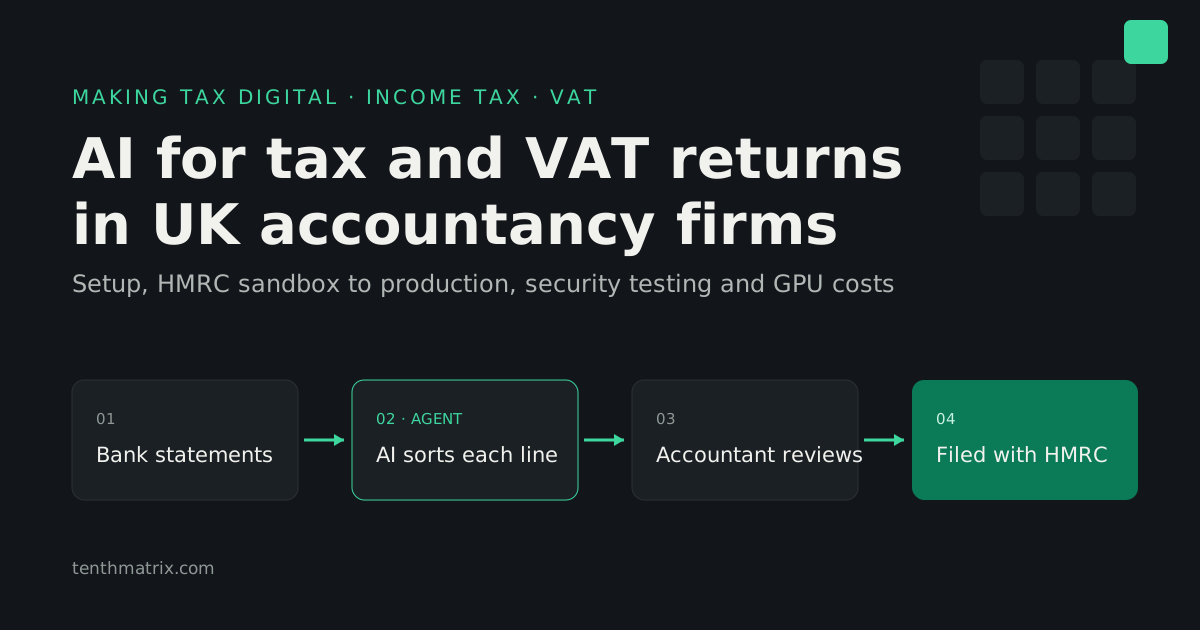
AI for Tax and VAT Returns: MTD Software for UK Accountancy Firms
How AI agents prepare Income Tax and VAT returns under Making Tax Digital, what an accountancy firm needs from HMRC from sandbox to production (penetration testing included), and the real cost of the AI: hosted, rented private GPUs or bought outright.
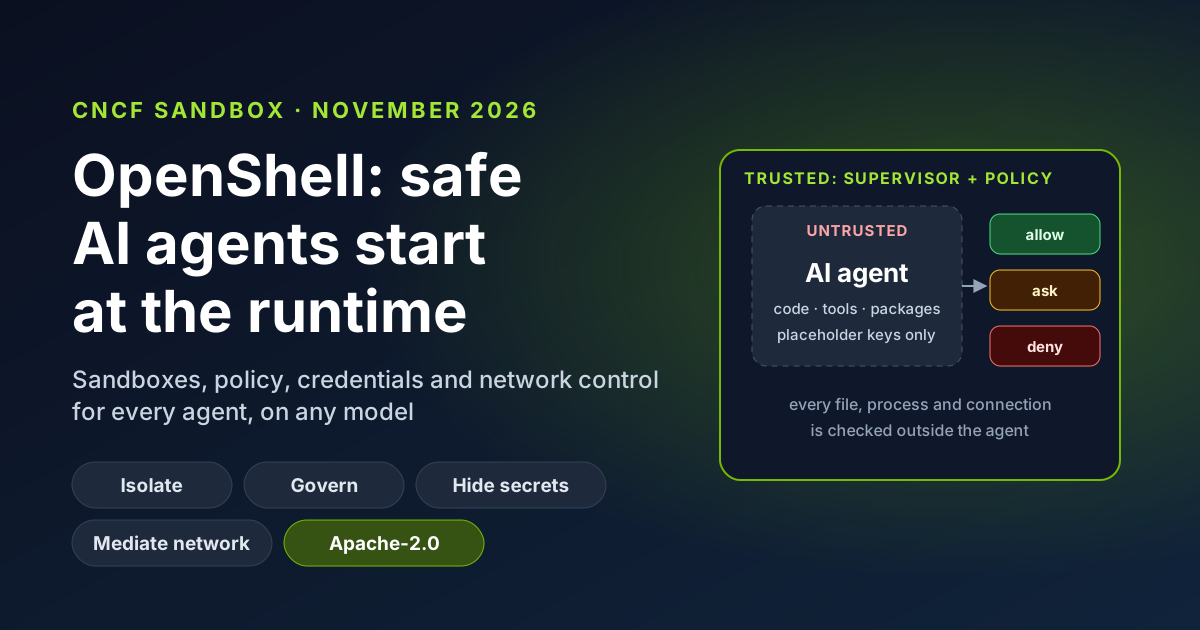
OpenShell Joins the CNCF: Why AI Agent Safety Starts at the Runtime
OpenShell, the secure runtime for AI agents created by NVIDIA, is now a CNCF Sandbox project. What it does in plain English, why runtime controls beat prompt instructions, the business benefits, and how TenthMatrix runs its own agents inside it every day.
Private AI on Your Own Hardware: Local Open-Source Models and Data Privacy
Open-weight AI models now run on hardware you own, so prompts, documents and answers never leave the building. What that means for data protection, cost and control, where it falls short, and how Ollama, vLLM and NVIDIA NIM fit.