Microsoft Graph is the single API in front of Microsoft Entra ID, Microsoft 365, Intune, the Microsoft security services and more. Microsoft describes it as "the gateway to data and intelligence in Microsoft cloud services like Microsoft Entra and Microsoft 365." One endpoint, https://graph.microsoft.com, one token and one set of conventions reach users, mail, files, Teams, devices and security alerts. This note explains how it works end to end, how it deals with the hardest problems of running services at cloud scale, and how to use it well: sign-in, queries, batching, throttling, keeping data in sync, bulk export and national clouds, with working patterns in curl, Python and PowerShell.
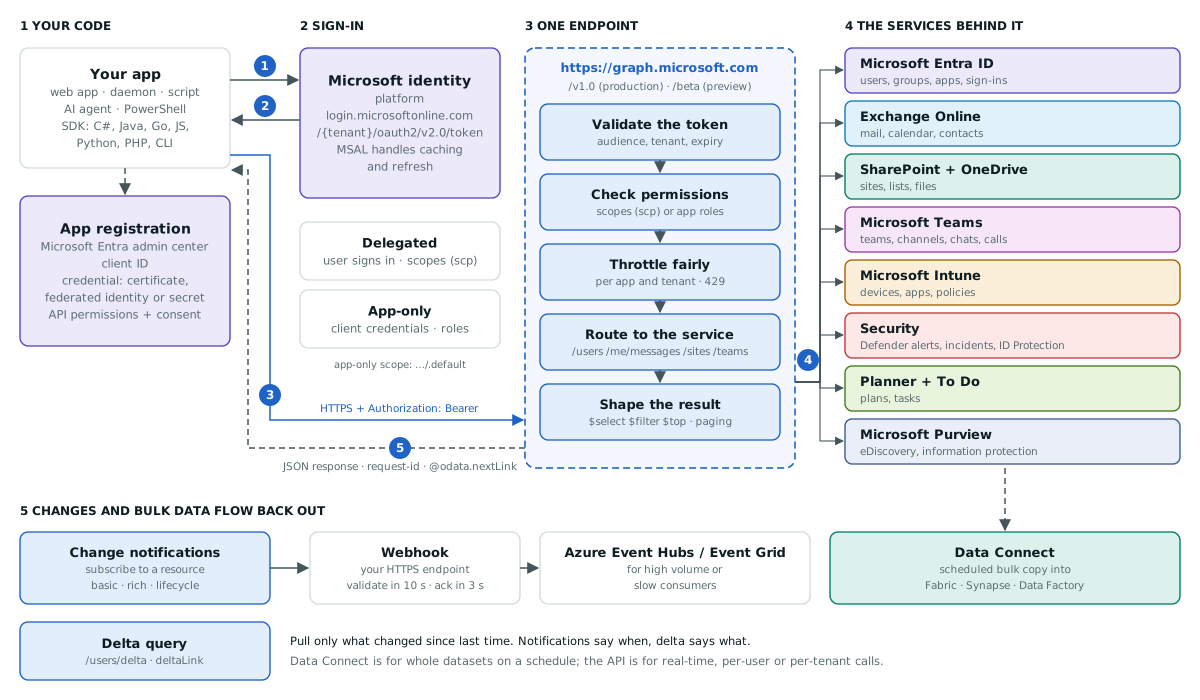
The whole workflow: ① your app asks the Microsoft identity platform for a token, ② gets an access token back, ③ calls Graph with it, ④ Graph checks it and routes to the service that owns the data, ⑤ the JSON answer comes back. Changes and bulk data flow back out through notifications, delta query and Data Connect.
1. What Microsoft Graph is
Before Graph, each Microsoft service had its own API, its own authentication and its own way of paging and filtering. Graph puts one REST surface in front of them. Every request has the same shape:
{HTTP method} https://graph.microsoft.com/{version}/{resource}?{query-parameters}

GET https://graph.microsoft.com/v1.0/me- Two versions.
v1.0holds generally available APIs; Microsoft's guidance is to "use the v1.0 version for all production apps."betaholds previews, and you should "not use beta APIs in your production apps." - Many services. Microsoft Entra ID (users, groups, applications, sign-ins), Outlook and Exchange Online (mail, calendar, contacts), SharePoint and OneDrive (sites, lists, files), Teams, Planner and To Do, OneNote, Excel, Intune and Windows device management, security services such as Defender XDR and Entra ID Protection, Microsoft Purview eDiscovery and information protection, Bookings, Viva and more.
- Copilot connectors (formerly Microsoft Graph connectors) work in the other direction: they bring outside data, such as Box, Google Drive, Jira or Salesforce, into Microsoft Graph so Microsoft 365 search and Copilot can use it.
The "graph" in Microsoft Graph
The name is literal. Resources are nodes and relationships are paths between them. Start at a user and you can walk to their mail, calendar, files, teams, groups, manager, devices and tasks, each owned by a different service but reached the same way.
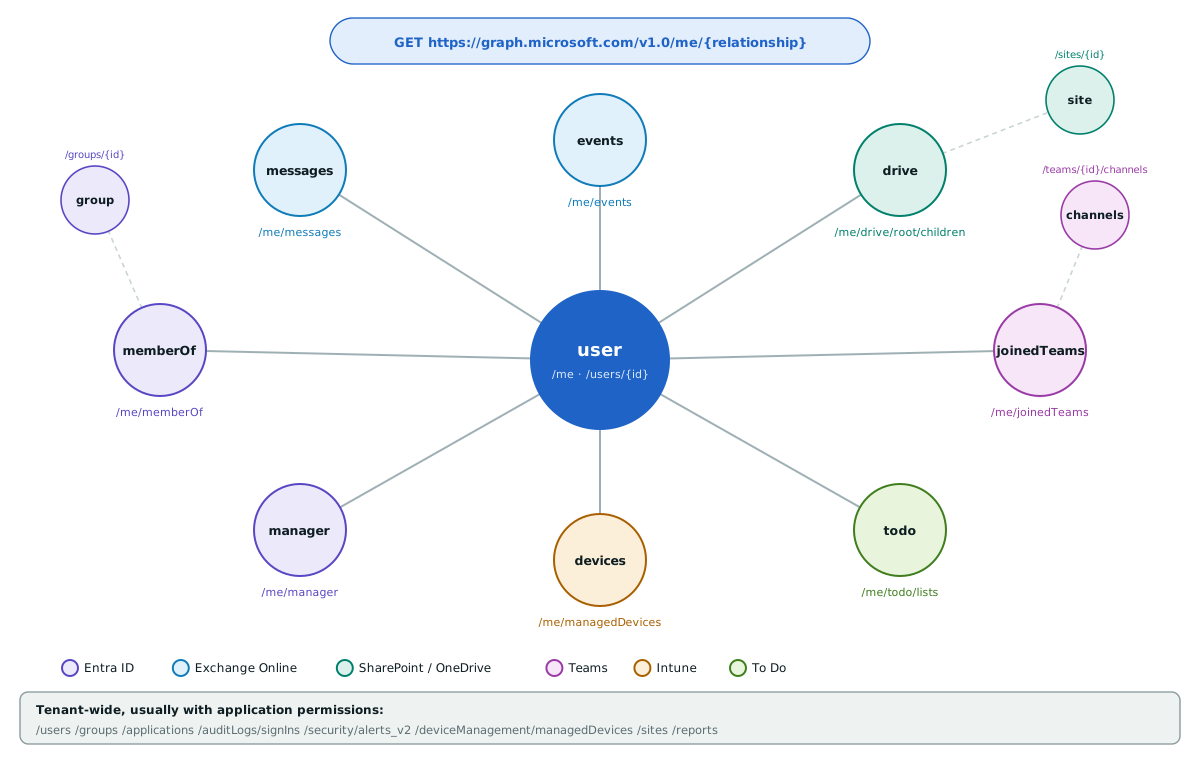
Each relationship is a path. /me/messages is served by Exchange Online, /me/drive by OneDrive, /me/joinedTeams by Teams and /me/managedDevices by Intune, yet they share one token and one query language.
2. The hard problems Graph solves
Running Microsoft's cloud services means serving a very large number of organisations at once, each with its own users, rules, devices and data, often in different jurisdictions. Graph's design is a set of answers to the problems that creates, for Microsoft and for anyone building on Azure and Microsoft 365.
| Challenge | How Graph handles it | Where you see it |
|---|---|---|
| Fragmented APIs: every service with its own endpoint, auth and paging | One endpoint, one token, one OData query language, one error and paging model | All services |
| Identity sprawl: users, groups and apps duplicated across systems | Microsoft Entra ID is the directory behind every call; the same user object links mail, files, Teams and devices | Entra ID, joiner/mover/leaver automation |
| Least privilege at scale: thousands of third-party apps reading company data | Granular permissions, delegated access limited to what both app and user may do, admin consent for high-impact and app-only permissions | App registrations, consent |
| Fair use in a shared cloud: one noisy app must not degrade a tenant or a service | Throttling per app, per tenant and per service, a cost per request, 429 with Retry-After | Identity, Outlook, Intune, Teams limits |
| Polling waste: millions of apps asking "has anything changed?" | Change notifications push events; delta query returns only what changed | Users, groups, mail, files, Teams |
| Event delivery at volume: webhooks that cannot keep up | Deliver notifications to Azure Event Hubs or Azure Event Grid instead of a web endpoint | Azure messaging services |
| Analytics over whole tenants: exporting everything through an online API | Microsoft Graph Data Connect copies datasets on a schedule into Microsoft Fabric, Azure Synapse or Azure Data Factory, with granular admin consent | Azure data platform |
| Data sovereignty: government and regional clouds that must stay separate | National cloud endpoints with their own sign-in; tokens are not interchangeable between clouds | US Government, China (21Vianet) |
| Security signal spread across products | One security API surface for alerts and incidents from Defender XDR, Entra ID Protection and more, plus sign-in and audit logs | SOC automation, SIEM feeds |
| Device fleets: laptops and phones across many locations | Intune enrolment, configuration and app management through the same API | Intune, Windows Update for Business |
| Legal and compliance holds | Microsoft Purview eDiscovery (Premium) cases and information protection labels | Purview |
| Grounding AI in company data | Copilot connectors bring outside content into Graph so it can be searched and used with the same permissions | Microsoft 365 Copilot, Microsoft Search |
Service by service
- Microsoft Entra ID. Create and manage users, groups and applications; read sign-in and audit logs. This is where onboarding and offboarding automation lives: create the account, add groups, assign licences, and remove all of it on the last day.
- Exchange Online. Mail, calendars and contacts. Typical uses are shared-mailbox triage, meeting scheduling and archiving. Subscriptions on messages tell you within minutes when mail arrives.
- SharePoint and OneDrive. Sites, lists and files. Delta query on a drive is the standard way to mirror or index documents without rescanning everything.
- Microsoft Teams. Teams, channels, chats and calls. Provision a team per project or customer from a template, post notifications to channels, or archive chats.
- Microsoft Intune. Enrol and configure devices and manage mobile applications. Compliance reports and remote actions run through the same API as the rest.
- Security. Alerts and incidents from Microsoft's security products, Entra ID Protection risk data, and conditional access policies, ready for a SIEM or an automated response.
- Microsoft Purview. eDiscovery cases and information protection for legal holds and data classification.
3. Signing in: registrations, tokens and permissions
Every call starts with an app registration in the Microsoft Entra admin center. It gives your code an application (client) ID, a redirect URI for interactive apps and, for server code, a credential: "a client secret..., a certificate, or a federated identity credential." Prefer certificates or federated identity over secrets, and never put a secret in source control.
| Delegated permissions (scopes) | Application permissions (app roles) | |
|---|---|---|
| Who is acting | The app, on behalf of a signed-in user | The app itself, with no user |
| Effective access | What both the app and the user are allowed | Everything the granted permission covers in the tenant |
| Example | User.Read, calls to /me | User.Read.All, calls to /users |
| Consent | The user, or an admin for higher-impact permissions | Always an administrator |
| Typical code | Web and mobile apps, PowerShell as you | Daemons, sync jobs, AI agents running unattended |
An app-only token comes from the client credentials flow. The scope is the resource with /.default, which asks for every application permission an admin has consented to:
curl -s -X POST "https://login.microsoftonline.com/$TENANT_ID/oauth2/v2.0/token" \
  -d client_id="$CLIENT_ID" \
  -d client_secret="$CLIENT_SECRET" \
  -d scope=https://graph.microsoft.com/.default \
  -d grant_type=client_credentials
# → {"token_type":"Bearer","expires_in":3599,"access_token":"eyJ0..."}
In real code, let MSAL or the Azure Identity library fetch, cache and refresh tokens. Request the least privileged permission that does the job: Microsoft's own advice is to "request the least privileged permissions that your app needs."
4. Asking for exactly what you need
Graph uses OData query parameters. Ask for fewer properties, filter on the server and page through large results:
TOKEN=...   # from the call above
curl -s -H "Authorization: Bearer $TOKEN" \
"https://graph.microsoft.com/v1.0/users?\$select=displayName,mail,jobTitle&\$filter=accountEnabled%20eq%20true&\$top=50"$selectpicks properties (columns),$filterpicks rows,$expandincludes related resources,$orderbysorts,$topsets the page size and$searchsearches.- Paging. If there is more, the response has
@odata.nextLink. Follow it as-is until it disappears. - Advanced directory queries. Counting and searching directory objects (for example
GET /users/$count) need theConsistencyLevel: eventualheader; send it on every page. - Writes are limited to 4 MB per request (some, such as event attachments, to 3 MB); larger requests get
413. - Every response carries a
request-idheader. Log it: it is what Microsoft support asks for.
5. Calling Graph at scale: batching and throttling
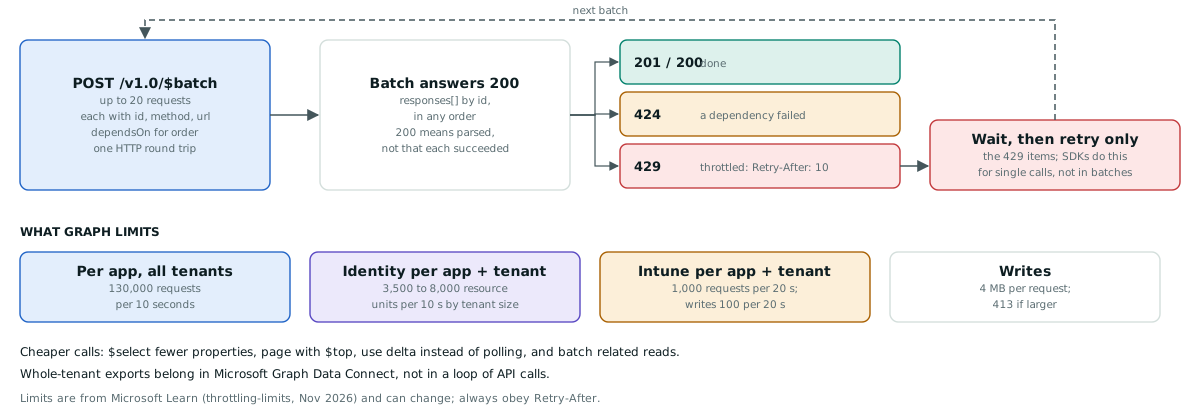
JSON batching combines up to 20 requests into one HTTP call. Each item has an id, a method and a relative url; dependsOn orders them. The batch answers 200 if it could be parsed, so check every item's own status:
POST https://graph.microsoft.com/v1.0/$batch
Content-Type: application/json

{
  "requests": [
    { "id": "1", "method": "GET", "url": "/me?$select=displayName" },
    { "id": "2", "method": "GET", "url": "/me/messages?$top=5&$select=subject,from" },
    { "id": "3", "method": "GET", "url": "/me/drive/root/children?$select=name,size" }
  ]
}
Throttling is how a shared cloud stays fair. When an app or a tenant goes over a limit, Graph answers 429 Too Many Requests with a Retry-After header. Microsoft's guidance: "Backing off requests using the Retry-After delay is the fastest way to recover from throttling," and "avoid immediate retries, because all requests accrue against your usage limits." Some published limits (Microsoft Learn, November 2026; they can change):
- Any service: 130,000 requests per 10 seconds per app across all tenants.
- Identity and access (users, groups, applications): 3,500, 5,000 or 8,000 resource units per 10 seconds per app and tenant, depending on tenant size. Requests have costs:
$selectlowers it and$expandraises it. - Intune: 1,000 requests per 20 seconds per app and tenant, of which 100 may be writes.
import random, time, requests

def graph_get(url, token, tries=6):
    for attempt in range(tries):
        r = requests.get(url, headers={"Authorization": f"Bearer {token}"}, timeout=30)
        if r.status_code not in (429, 503, 504):
            r.raise_for_status()
            return r.json()
        # Obey Retry-After when present; otherwise back off exponentially with jitter.
        wait = int(r.headers.get("Retry-After", 0)) or min(60, 2 ** attempt + random.random())
        time.sleep(wait)
    raise RuntimeError(f"Graph still throttling after {tries} tries: {url}")
The Graph SDKs retry single calls this way for you. They do not retry the throttled items inside a batch; that is your job.
6. Keeping data in sync without polling
Polling every few minutes is the quickest way to get throttled. Graph has two tools that together "nearly eliminate" it: change notifications tell you when something changed, and delta query tells you what changed.
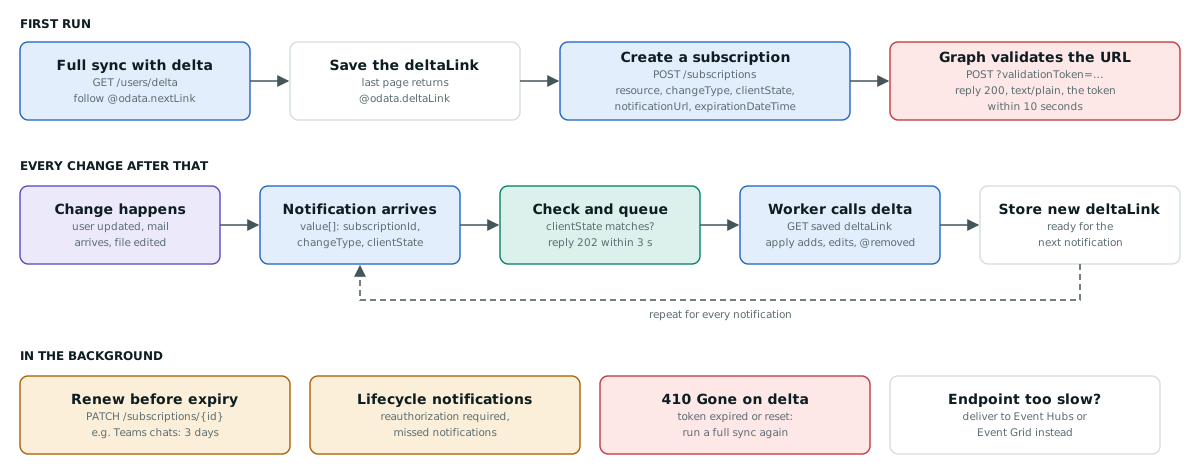
Step 1: a full sync with delta query
def sync_users(token, link=None):
    """Apply every change since `link` (or everything), return the new deltaLink."""
    url = link or "https://graph.microsoft.com/v1.0/users/delta?$select=displayName,mail,accountEnabled"
    while True:
        try:
            page = graph_get(url, token)
        except requests.HTTPError as err:
            if err.response is not None and err.response.status_code == 410:
                return sync_users(token)  # delta token expired or reset: start again
            raise
        for user in page["value"]:
            if "@removed" in user:
                delete_user(user["id"])     # reason: "changed" (restorable) or "deleted"
            else:
                upsert_user(user)
        if "@odata.nextLink" in page:
            url = page["@odata.nextLink"]   # more pages in this round
        else:
            return page["@odata.deltaLink"]  # round complete: save it for next time
Delta tokens for directory objects last seven days. Your code must also accept replays: the same change can arrive twice.
Step 2: subscribe to changes
POST https://graph.microsoft.com/v1.0/subscriptions
Content-Type: application/json

{
  "changeType": "created,updated,deleted",
  "notificationUrl": "https://hooks.example.com/graph",
  "lifecycleNotificationUrl": "https://hooks.example.com/graph/lifecycle",
  "resource": "/users",
  "expirationDateTime": "2026-12-10T09:00:00Z",
  "clientState": "a-long-random-secret-only-you-and-graph-know"
}
Before the subscription exists, Graph sends POST {notificationUrl}?validationToken=…. Your endpoint must reply within 10 seconds with 200 OK, Content-Type: text/plain and the decoded token as the body. After that, each notification must be acknowledged with a 2xx within 3 seconds, so validate, queue and return 202:
import asyncio, hmac, os
from fastapi import FastAPI, Request, Response

app = FastAPI()
CLIENT_STATE = os.environ["GRAPH_CLIENT_STATE"]
changes: asyncio.Queue = asyncio.Queue()   # a worker drains this and runs sync_users()

@app.post("/graph")
async def graph_webhook(request: Request):
    token = request.query_params.get("validationToken")
    if token:  # subscription validation: echo the plain-text token within 10 seconds
        return Response(content=token, media_type="text/plain")
    body = await request.json()
    for note in body.get("value", []):
        if hmac.compare_digest(note.get("clientState", ""), CLIENT_STATE):
            await changes.put(note)   # ignore anything that is not from our subscription
    return Response(status_code=202)  # acknowledge within 3 seconds
Step 3: keep subscriptions alive
Subscriptions expire and must be renewed with PATCH /subscriptions/{id} before they do. Maximum lifetimes vary by resource:
| Resource | Maximum lifetime |
|---|---|
| Users, groups, other directory objects | 41,760 minutes (under 29 days) |
| Files (driveItem) and SharePoint lists | 42,300 minutes |
| Outlook messages, events, contacts | 10,080 minutes (under 7 days); 1,440 with resource data |
| Teams chats, messages, teams, channels | 4,320 minutes (3 days) |
| Presence | 60 minutes |
Lifecycle notifications warn you when a subscription needs reauthorising or has missed notifications. If your endpoint is slow (more than 10% of responses over 3 seconds in 10 minutes), Graph delays delivery; if it keeps failing, notifications are dropped. For high volume, deliver to Azure Event Hubs or Azure Event Grid instead. Rich notifications can include the changed resource data, encrypted with a certificate you provide.
7. Whole-tenant data: Microsoft Graph Data Connect
For analytics over the whole organisation, such as collaboration patterns, mailbox metadata or SharePoint inventories, an online API is the wrong tool. Microsoft's guidance is that "solutions that need to extract a large volume of data from Microsoft Graph should use Microsoft Graph Data Connect." It copies datasets from Entra ID, Outlook, Teams, SharePoint and more on a schedule into Microsoft Fabric, Azure Synapse or Azure Data Factory and your own Azure Storage. Administrators approve it per dataset and per group of users, and it is billed through your Azure subscription. It is not available in the national clouds.
8. National clouds
Government and regional clouds have their own sign-in and Graph endpoints, and "access tokens acquired for a national cloud deployment are not interchangeable." Make both base URLs configuration, never constants:
| Cloud | Sign-in | Microsoft Graph |
|---|---|---|
| Global service (and US GCC) | login.microsoftonline.com | graph.microsoft.com |
| US Government L4 (GCC High) | login.microsoftonline.us | graph.microsoft.us |
| US Government L5 (DoD) | login.microsoftonline.us | dod-graph.microsoft.us |
| China, operated by 21Vianet | login.chinacloudapi.cn | microsoftgraph.chinacloudapi.cn |
Not every service is available in every national cloud, and Graph Explorer works only against the global service.
9. SDKs, PowerShell and tools
Microsoft publishes Graph SDKs for C#, Java, Go, TypeScript and JavaScript, PHP, Python, PowerShell and a CLI. They add retry handling, redirects, authentication, compression, paging and batching. A Python example with a certificate credential:
import asyncio
from azure.identity import ClientCertificateCredential
from msgraph import GraphServiceClient

credential = ClientCertificateCredential(TENANT_ID, CLIENT_ID, certificate_path="graph-app.pem")
client = GraphServiceClient(credential, scopes=["https://graph.microsoft.com/.default"])

async def main():
    users = await client.users.get()
    for user in users.value:
        print(user.display_name, user.mail)

asyncio.run(main())
Microsoft Graph PowerShell replaces the old Azure AD and MSOnline modules, runs on Windows, macOS and Linux, and exposes the whole API:
Install-Module Microsoft.Graph -Scope CurrentUser
Connect-MgGraph -Scopes "User.Read.All"
Get-MgUser -Top 5 -Property DisplayName,Mail | Select-Object DisplayName, Mail
To explore before you write code, use Graph Explorer, which also has sample data you can query without signing in.
10. Graph and AI agents
Graph is the natural tool layer for an AI agent that works in Microsoft 365: read a mailbox, find a document, check a calendar, file a task. The rules above matter more, not less, when an agent is the caller:
- Give each agent its own app registration and the narrowest permissions it needs. Prefer delegated permissions, so the agent can never see more than the person it acts for.
- Wrap each Graph call as a named tool with fixed parameters rather than letting a model build arbitrary URLs.
- Treat mail bodies and documents as untrusted input to the model, not as instructions.
- Send writes, such as emails, deletions or permission changes, to a person for approval.
- Use delta query and notifications so the agent reacts to change instead of re-reading everything.
11. Production checklist
- Use
v1.0in production; keepbetafor experiments. - Use certificates or federated identity credentials, kept in a vault such as Azure Key Vault, rather than client secrets in config.
- Request the least privileged permissions, and review consented permissions regularly.
- Always use
$select; follow@odata.nextLink; never build your own paging. - Obey
Retry-After; back off exponentially when it is missing; retry throttled batch items yourself. - Replace polling with change notifications plus delta query; validate
clientState; acknowledge within 3 seconds. - Renew subscriptions before they expire and handle lifecycle notifications and
410 Gone. - Use Data Connect, not the API, for whole-tenant exports.
- Make sign-in and Graph base URLs configuration so national clouds work.
- Log the
request-idof every failed call.
How TenthMatrix can help
We build integrations and AI agents on Microsoft Graph: identity automation in Entra ID, document and mailbox workflows across Exchange Online, SharePoint and Teams, security feeds, and agents that act for your staff with the least access they need. See AI agent development and Claude agents, or tell us what you want to automate in Microsoft 365.
Sources: Microsoft Learn documentation for Microsoft Graph (overview, use the API, authentication, throttling and service limits, JSON batching, change notifications and webhook delivery, delta query, national cloud deployments, Data Connect, SDKs and Microsoft Graph PowerShell), read in November 2026. Limits and lifetimes change; check the current documentation before you rely on a number. Code samples follow the documented API and were not run against a live tenant for this note. The diagrams are our own. Microsoft, Microsoft Graph, Microsoft 365, Microsoft Entra, Azure, Teams, Outlook, SharePoint, OneDrive, Intune, Purview and Defender are trademarks of the Microsoft group of companies.