This is the long-form technical note for developers and platform engineers. For a shorter overview aimed at business managers, read the companion blog post.
1. Why agent security belongs in the runtime
A coding agent is an untrusted program with a very good reason to run. It executes code it has just written, installs packages it has just chosen, reads files it was not explicitly given and calls APIs with whatever credentials are in its environment. Every guardrail that lives in the prompt or the model ("do not read .env", "only push to feature branches") is advisory. It holds until a model makes a mistake or someone else's text tells it otherwise.
The realistic threats are boring and effective:
- Indirect prompt injection. A README, issue comment, web page or tool result contains instructions. The agent follows them with your credentials.
- Supply chain. A dependency's install script runs with the agent's file and network access.
- Credential exfiltration. Tokens in environment variables,
~/.configor a.envfile are onecurlaway from an attacker's server. - Side channels. DNS lookups to an attacker-controlled domain, or a request to the cloud metadata service at
169.254.169.254. - Plain mistakes.
rm -rfin the wrong directory, a force push, a loop against a paid API.
None of these is solved by a better system prompt. They are solved the way we have always handled untrusted code: least privilege, enforced by the kernel and by a network chokepoint the workload cannot bypass. That is OpenShell's job. We use it every day at TenthMatrix to run our own coding agents, and this note is the guide we would give a developer joining the team.
2. What joined the CNCF, and what it means for you
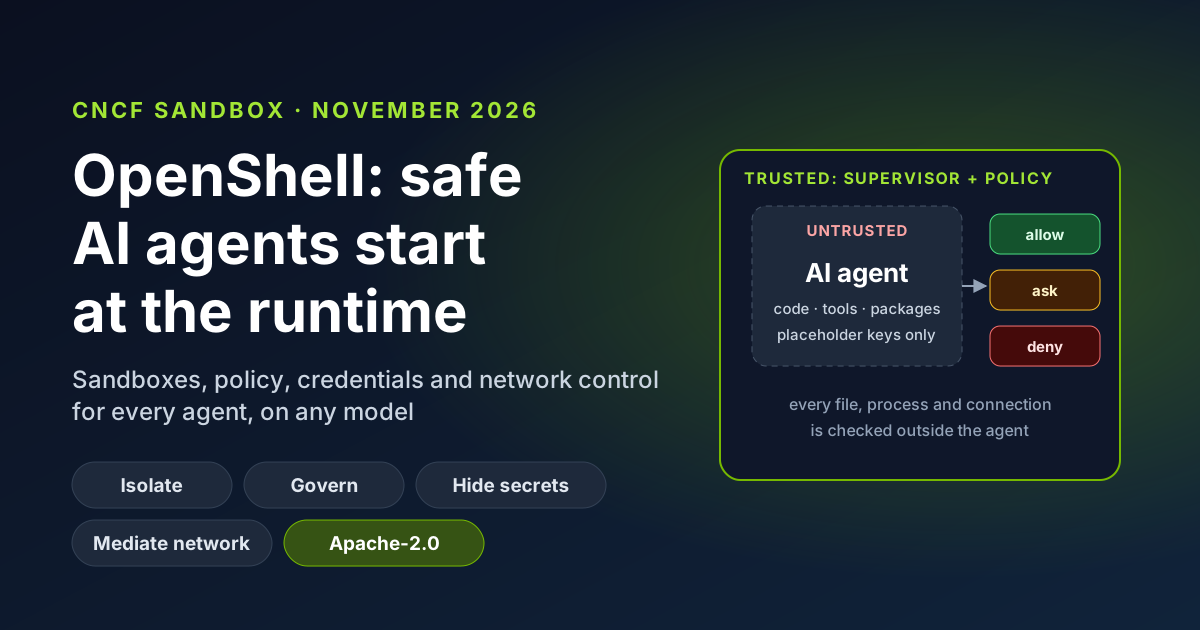
On 10 November 2026 the Cloud Native Computing Foundation announced that OpenShell is joining as a Sandbox project, "bringing the secure runtime for autonomous AI agents into vendor-neutral, ecosystem-led stewardship". The announcement describes it as adding "runtime governance and policy enforcement for autonomous agents", and says it governs "how agents execute, which resources and data they can access and where inference requests are routed". It joined alongside other AI infrastructure projects, including Agent Substrate and llm-d, taking the CNCF portfolio to 231 projects (CNCF announcement).
Practical facts for developers:
- Licence: Apache 2.0.
- Code: github.com/NVIDIA/OpenShell today. The README says development is moving to the
ai-openshellGitHub organisation; until the move completes, issues and pull requests stay in the NVIDIA repository. - Version: 0.1.8, released on 10 November 2026. The 0.1.x line introduced a stable release cadence; earlier 0.0.x releases exist, and there is an upgrade guide for 0.1.0.
- Maturity: CNCF Sandbox is the entry stage for experimental projects. Pin versions, read release notes, and expect the CLI and policy schema to keep evolving.
- SDKs: Python, TypeScript, Go and Rust.
3. Architecture: the agent asks, the supervisor decides
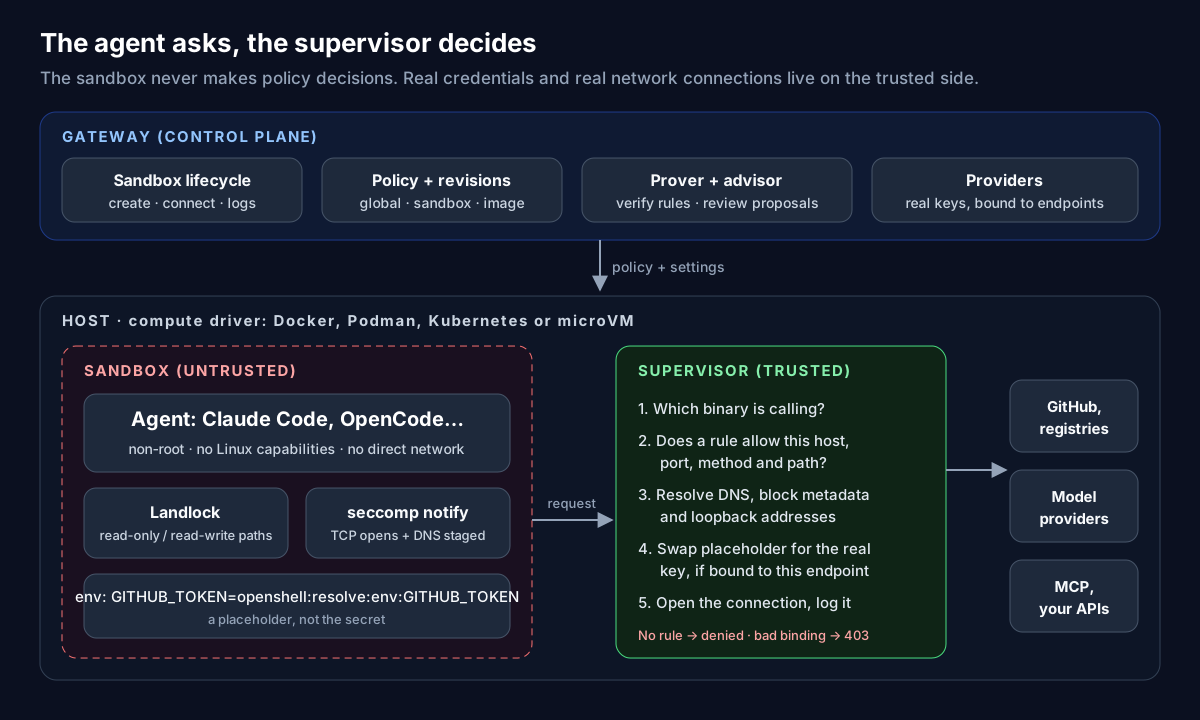
OpenShell splits every deployment into a trusted side and an untrusted side. The components are:
| Component | Side | What it does |
|---|---|---|
| Gateway | Trusted | The control plane. Manages sandbox lifecycle and delivers policy and settings. The installer sets up a local gateway at https://127.0.0.1:17670 on Linux (https://localhost:17670 on macOS). |
| Compute driver | Trusted | Provisions the workload and its supervisor, and builds the isolation boundary on Docker, Podman, Kubernetes or a microVM. |
| Supervisor | Trusted | Checks each request against policy, supplies credentials, resolves DNS, opens approved connections and keeps the link to the gateway. |
| Sandbox | Untrusted | Shares the boundary with the agent. It reports what the agent is trying to do and never makes policy decisions. |
| Policy prover | Trusted | Formally checks proposed policy changes before they are approved. Also ships as a standalone openshell-prover command you can run in CI. |
| Policy advisor | Trusted | Lets the agent propose narrow network rules that a human reviews and approves. |
The design principle to remember: the sandbox is assumed compromised. Anything that matters, such as real credentials, DNS resolution and the decision to open a socket, happens on the supervisor's side of the boundary.
4. The isolation layers
OpenShell stacks several Linux mechanisms rather than relying on one:
- Landlock limits filesystem access to the paths in the policy. It needs Landlock ABI v3 or later in the kernel.
- seccomp user notification intercepts network operations, TCP connection opens and DNS queries, and hands them to the supervisor instead of letting the kernel complete them.
- No privileges. The workload runs as a single non-root identity with no Linux capabilities. The policy schema rejects root as a run-as user.
- No direct network. With the Docker and Podman drivers the workload container has networking turned off; the supervisor runs in its own container and is the only path out.
The supported compute drivers, as documented for 0.1.8:
| Driver | Requirements and notes |
|---|---|
| Docker | Docker Desktop or Docker Engine 28.0 or later. The Docker snap package is not compatible. |
| Podman | Podman 5.x with cgroups v2. |
| Kubernetes | Installed with a Helm chart. The multi-tenant supervisor is marked experimental. |
| MicroVM | Hypervisor.framework on macOS (Apple Silicon), KVM on Linux. A stronger boundary when you do not want to share a kernel. |
| Windows | WSL 2 is experimental; native Windows MXC is in development and not production-qualified. |
Linux packages need glibc 2.28 or newer.
5. Install and create your first sandbox
The installer sets up the CLI and a local gateway:
# Install the CLI and a local gateway (pin a release with OPENSHELL_VERSION)
curl -LsSf https://raw.githubusercontent.com/NVIDIA/OpenShell/main/install.sh | sh

# Check the gateway is up
openshell status

# A first, empty sandbox (minimal Ubuntu, no agent installed)
openshell sandbox create --name demo
On Linux the gateway runs as a user service, so systemctl --user status openshell-gateway shows its state, and openshell-gateway config preflight --path ~/.config/openshell/gateway.toml validates its configuration before a restart.
Two settings to decide on day one:
- Pin the version. Set
OPENSHELL_VERSIONto a release tag when installing, so every developer and CI runner gets the same behaviour. - Telemetry. Anonymous telemetry is on by default. Set
OPENSHELL_TELEMETRY_ENABLED=falseon the gateway if your policy requires it.
6. Run a real agent
OpenShell runs any agent that is available in a sandbox image. The pattern is always the same: register a provider that holds a credential, then create a sandbox from an image, attach the provider and give the command to run.
The documented quick start runs OpenCode against OpenRouter:
# 1. Import the provider profile (allowed endpoints, binaries and credential names)
openshell profile import --url https://raw.githubusercontent.com/NVIDIA/OpenShell/main/providers/openrouter.yaml

# 2. Create a provider from the key already in your local environment
openshell provider create --name openrouter --type openrouter --from-existing

# 3. Start the agent in a sandbox with that provider attached
openshell sandbox create --name my-agent \
  --from ghcr.io/anomalyco/opencode:latest \
  --provider openrouter \
  -- opencode -m openrouter/nvidia/nemotron-3.5-lightning:free
For Claude Code, the same shape applies with a claude-code provider, and you can attach several providers at once, for example the model plus GitHub:
openshell provider create --name my-claude --type claude-code --from-existing
openshell sandbox create --from <your-agent-image> \
  --provider my-claude --provider my-github \
  -- claude
Day-to-day commands:
# Attach to the agent (detach with Ctrl-D, or Ctrl-P then Ctrl-Q)
openshell sandbox connect my-agent

# A second shell in the same sandbox
openshell sandbox exec -n my-agent --tty -- /bin/bash

# What the agent tried to do in the last five minutes
openshell logs my-agent --since 5m --source sandbox

# Registered providers and available provider profiles
openshell provider list
openshell profile list
7. The policy file, field by field
A policy is a YAML document (at most 4 MiB). Unknown fields and duplicate keys are rejected, which is exactly what you want from a security config: a typo fails loudly instead of silently widening access. Here is a complete, minimal policy for a coding agent that may read the GitHub API with curl:
version: 1

filesystem_policy:            # applied when the sandbox starts
  include_workdir: true       # defaults to false once this block exists
  read_only:
    - /usr
    - /etc
  read_write:
    - /tmp

landlock:
  compatibility: hard_requirement   # fail closed if the kernel lacks Landlock

process:
  run_as_user: sandbox        # or a numeric id; root is rejected
  run_as_group: sandbox

network_policies:             # applied live, no restart
  github_readonly:
    endpoints:
      - host: api.github.com
        port: 443
        protocol: rest
        enforcement: enforce  # the default is audit
        access: read-only
    binaries:
      - path: /usr/bin/curl
What each section controls and when it takes effect:
| Section | Controls | Applied |
|---|---|---|
filesystem_policy | read_only and read_write path lists, plus include_workdir. Absolute paths only, at most 256 of them; / is not allowed as read-write. | At start |
landlock | compatibility: best_effort (default) or hard_requirement. | At start |
process | run_as_user and run_as_group. | At creation |
network_policies | Named rules, each a list of endpoints and a list of binaries. Every listed binary may reach every listed endpoint. | Live (hot reload) |
network_middlewares | Request-processing middleware for network traffic. | Live |
Where the effective policy comes from, in order of precedence: a global policy set by a platform admin, the sandbox's saved policy, a policy baked into the image, then the restrictive default. A sandbox with no rules can reach nothing.
8. Network rules: allow, enforce, approve
Every outbound connection goes through the same path. The agent opens a socket or makes a DNS lookup; seccomp stops it; the sandbox identifies the calling binary and asks the supervisor; the supervisor checks the request against policy, adds credentials if allowed, and opens the real connection. A connection that no rule allows is denied.
An endpoint can be matched on far more than host and port:
protocol:rest,websocket,graphql,mcp,json-rpcortcp. Request-level checks need one of the application protocols;tcpendpoints get no request-level inspection.access: the presetsread-only,read-writeandfull. Userulesanddeny_rulesinstead when you need method and path detail (the two styles cannot be combined). Deny rules always win over allow rules.enforcement:auditorenforce. The default isaudit, which logs request-level violations instead of blocking them. Setenforceexplicitly on anything that matters.binaries: the real path of each program allowed to use the rule, not a symlink. Check withreadlink -f $(which curl)inside your image, becausepython3,nodeand package managers are often symlinks.
Change rules on a running sandbox without restarting it:
# Add or change one rule (format: host:port:access:protocol:enforcement)
openshell policy update my-agent --rule-name github_readonly \
  --binary /usr/bin/curl \
  --add-endpoint api.github.com:443:read-only:rest:enforce --wait

# Preview a change without applying it
openshell policy update my-agent --rule-name github_readonly \
  --binary /usr/bin/curl --add-endpoint api.github.com:443:read-only:rest:enforce --dry-run

# Replace the whole policy from a file in your repository
openshell policy set my-agent --policy ./openshell/policy.yaml --wait

# Inspect: base policy, effective policy, revision history
openshell policy get my-agent --base
openshell policy get my-agent --full
openshell policy list my-agent
With --wait, exit code 1 means the sandbox rejected the revision and 124 means the wait timed out, which makes these commands safe to script.
When the agent needs a destination it does not have, the policy advisor lets it propose a narrow rule instead of failing. You review the proposals:
openshell rule get my-agent --status pending
openshell rule approve my-agent --chunk-id <chunk-id>
openshell rule reject my-agent --chunk-id <chunk-id> --reason "use the internal mirror"
There is also openshell rule approve-all. Treat it like chmod 777: fine on a throwaway sandbox, not on one that holds production credentials.
Built-in protections you do not have to write rules for: connections to loopback, link-local addresses and the cloud metadata address 169.254.169.254 are never authorised by network policy.
9. Credentials the agent never sees
Providers store credentials on the trusted side and bind each one to approved endpoints. Inside the sandbox, the agent's environment holds a placeholder of the form openshell:resolve:env:KEY. When the agent sends a request, the supervisor replaces the placeholder with the real value, but only if three checks pass:
- The network policy allows this binary to reach this destination.
- The credential's binding covers this host, port and path.
- The placeholder sits in a declared slot: a header, a query parameter or a path segment.
If any check fails, the request is refused with HTTP 403 and credential_endpoint_mismatch. A prompt-injected agent that tries to post its GitHub token to attacker.example sends a meaningless placeholder, and the request is blocked anyway because no rule allows that host.
Schema options cover the awkward cases: request-body and WebSocket credential rewriting, and request signing for AWS-style sigv4. Provider profiles are YAML too; inspect and reuse them with:
openshell profile describe github
openshell profile export github -o yaml > providers/github.yaml
openshell profile lint -f providers/github.yaml
openshell profile import -f providers/github.yaml

# Attach or detach a provider on a running sandbox
openshell sandbox provider attach my-agent my-github --wait
openshell sandbox provider detach my-agent my-github --wait
Two caveats to design around. A process that is already running does not receive newly attached variables, so start a new process after attaching. And credential injection does not scrub secrets from upstream responses: if an API echoes your token back, the agent can see it. Prefer scoped, short-lived tokens for anything you attach.
10. Inference: the workload chooses the model
Earlier OpenShell releases had a workspace-wide managed inference route and openshell inference commands. Current releases removed them. Today the agent calls the model provider's native API directly, and OpenShell treats that call like any other: the provider profile defines the allowed endpoints, and the supervisor injects the key only for those. The docs put it plainly: the workload, not OpenShell, selects the model and the request timeout.
For local models, a provider profile can point at the gateway host through host.openshell.internal, for example an Ollama server with OPENAI_BASE_URL=http://host.openshell.internal:11434/v1. That keeps prompts and data on your own hardware while the agent stays sandboxed. If you run local models on a Mac Studio or a GPU workstation, our earlier post on OpenShell on Mac Studio and GPU workstations covers the hardware side; note that it predates the removal of managed inference routes.
11. The benefits for developers
| Benefit | Why it matters day to day |
|---|---|
| Run agents with fewer prompts for permission | With the boundary enforced outside the agent, you can let it run commands without approving each one, and still sleep at night. |
| Your laptop stays yours | SSH keys, browser sessions, cloud credentials and other repositories are outside the sandbox. |
Secrets out of .env | Placeholders in the sandbox, real keys bound to endpoints. Leaked logs and transcripts contain nothing useful. |
| Read-only by default | Method- and path-level rules let an agent read issues and pull requests while writes need a separate, deliberate rule. |
| Policy as code | YAML with a strict schema, revisions, --dry-run, and a prover you can run in CI. Review access changes like any other pull request. |
| Live changes | Network rules hot-reload, so you do not lose the agent's context to widen access. |
| One model for every agent | Claude Code, OpenCode or your own agent, any model provider, the same controls. Switching vendors does not mean rebuilding guardrails. |
| Laptop to cluster | The same CLI and policy files on Docker, Podman, microVMs and Kubernetes. |
| Evidence for security reviews | Logs of what the agent attempted and which rule allowed or denied it. |
12. A daily workflow that works
How we suggest a team adopts OpenShell, based on running it every day:
- One sandbox per task or repository. Short-lived sandboxes keep the blast radius and the credential set small. Delete them when the work merges.
- Keep the policy in the repository, next to the code the agent works on, for example
openshell/policy.yaml, and apply it withopenshell policy set. - Start narrow. The model provider, the Git host read-only, and the package registry your project uses. Nothing else.
- Turn proposals into code. When you approve a rule the agent proposed, copy it into the policy file so the next sandbox starts with it, and so the change is reviewed.
- Write access is a separate rule. Pushing branches or commenting on pull requests gets its own rule with
enforce, scoped to the paths it needs. - Prove changes in CI. Run
openshell-proveron policy changes in your pipeline, the same way you lint Terraform or Kubernetes manifests. - Read the logs weekly. Denied requests show you either a missing rule or an agent doing something it should not. Both are worth knowing.
13. Limits and gotchas
enforcementdefaults toaudit. If you forgetenforce, request-level rules log instead of block.- Wildcard hosts such as
*.example.comcan allow data exfiltration through DNS. The docs recommend exact hostnames. - Inspection gaps:
tcpendpoints get no request-level checks, client-to-server WebSocket binary frames are not inspected, and MCP tool arguments are not matched. Do not rely on request-level rules for those. - Responses are not scrubbed of credentials an upstream API echoes back.
- Kernel requirement: Landlock ABI v3 or later. With
hard_requirementan older kernel fails at startup; withbest_effortit degrades. Choose deliberately. - Platform maturity: Windows support is experimental or in development, and the Kubernetes multi-tenant supervisor is experimental.
include_workdirflips from true to false as soon as you add afilesystem_policyblock. Set it explicitly.- Fast-moving project: features change between releases (the managed inference route is one example). Pin versions and read release notes before upgrading.
14. Where OpenShell fits in a wider stack
OpenShell governs what happens inside and around one agent. A production deployment still needs the layers around it:
- Secrets: providers decide which agent can use a credential; a secrets platform such as Vault10x decides where that credential lives, who can rotate it and how it is audited.
- Edge and API gateway: Proxy10x applies rate limits, a web application firewall and access profiles to the APIs your agents call.
- Identity and network: zero-trust access so agents and the people who supervise them reach internal systems over authenticated paths.
- Least privilege in your own systems: a read-only token is still the best rule of all.
15. Checklist
- Pin
OPENSHELL_VERSIONand decide on telemetry. - Check the kernel supports Landlock ABI v3; use
hard_requirementwhere it does. - Use providers for every credential; remove keys from images and
.envfiles. - Exact hostnames,
enforceon every endpoint, real binary paths. - Read-only first; writes as separate, reviewed rules.
- Policy files in Git, applied with
policy set, proven in CI. - Review pending rules and denied requests regularly.
16. References
- CNCF announcement, 10 November 2026
- OpenShell on GitHub (moving to the
ai-openshellorganisation) - Architecture, policy schema, network rules and providers in the OpenShell documentation
Want help putting your team's agents inside OpenShell, or designing an agent whose guardrails your security team will sign off? Contact us, or start with the AI agent journey. See also our AI agents services.