This is the long-form technical note for developers. For the business case, read the companion blog post.
1. Why run models locally
Prompts are data. A developer pastes a stack trace that contains a customer's email address; a support agent pastes a complaint; a script sends a whole contract for summarising. With a hosted API, every one of those requests leaves your network, lands in someone else's logs and is governed by someone else's retention policy. With a local model, the data path ends at a process on a machine you control.
That is the main reason to run open-weight models yourself. The others follow from it: fixed cost instead of per-token billing, no rate limits, offline operation, pinned model versions that never change under you, and the freedom to fine-tune or wrap the model however you like. The price is that you run the infrastructure and accept that today's best local models trail the largest frontier models on the hardest tasks.
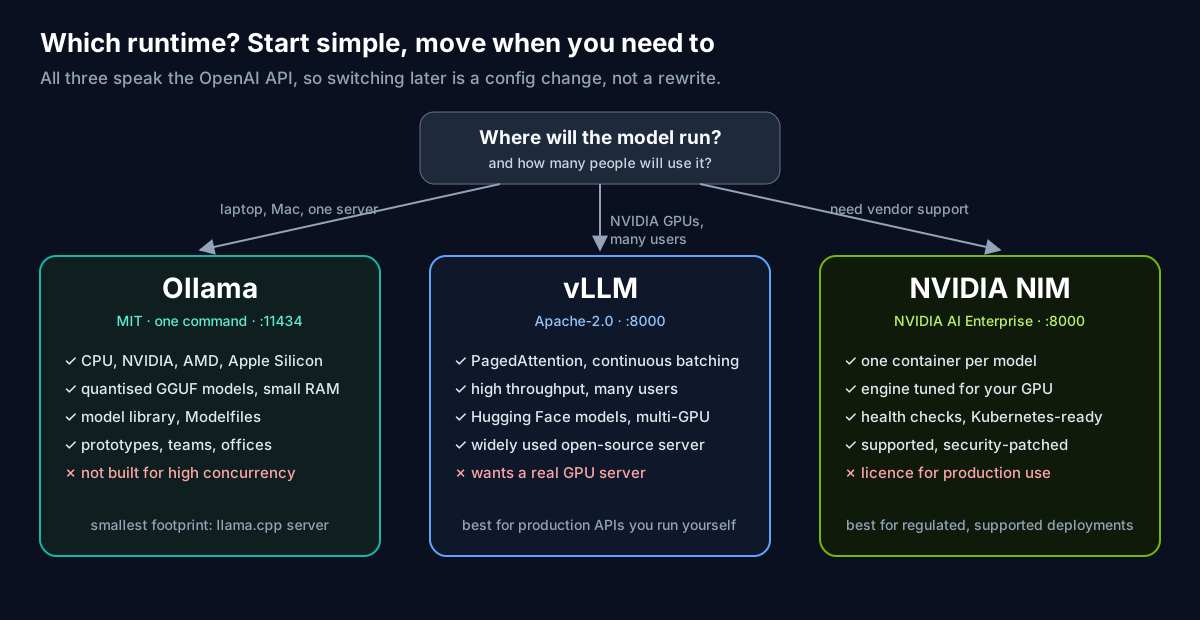
This note sets up the three runtimes most teams reach for, all in Docker:
 Ollama


We then wire them to the same client code, put a chat UI in front, cut the network, and run some fun (and useful) examples. Every example output below is real: we ran it on our own machines in November 2026, using Ollama 0.40.16 in Docker and native Ollama on an Apple Silicon Mac.
2. The runtimes at a glance
| Ollama | vLLM | NVIDIA NIM | |
|---|---|---|---|
| Licence | MIT | Apache 2.0 | Proprietary; free for development through the NVIDIA Developer Program, production via NVIDIA AI Enterprise |
| Image | ollama/ollama (:rocm for AMD) | vllm/vllm-openai (vllm/vllm-openai-cpu for CPU) | nvcr.io/nim/<publisher>/<model>, one per model |
| Hardware | CPU, NVIDIA, AMD; Apple Silicon when run natively | NVIDIA GPUs first; other accelerators and CPU builds exist | NVIDIA GPUs |
| Models | Ollama library, quantised GGUF | Hugging Face repositories | NVIDIA-packaged models on NGC |
| API | Native /api/* plus OpenAI-compatible /v1 on port 11434 | OpenAI-compatible /v1 on port 8000 | OpenAI-compatible /v1 on port 8000, plus /v1/health/ready |
| Sweet spot | Laptops, Macs, single servers, prototypes | High-throughput serving to many users | Supported, optimised enterprise deployments |
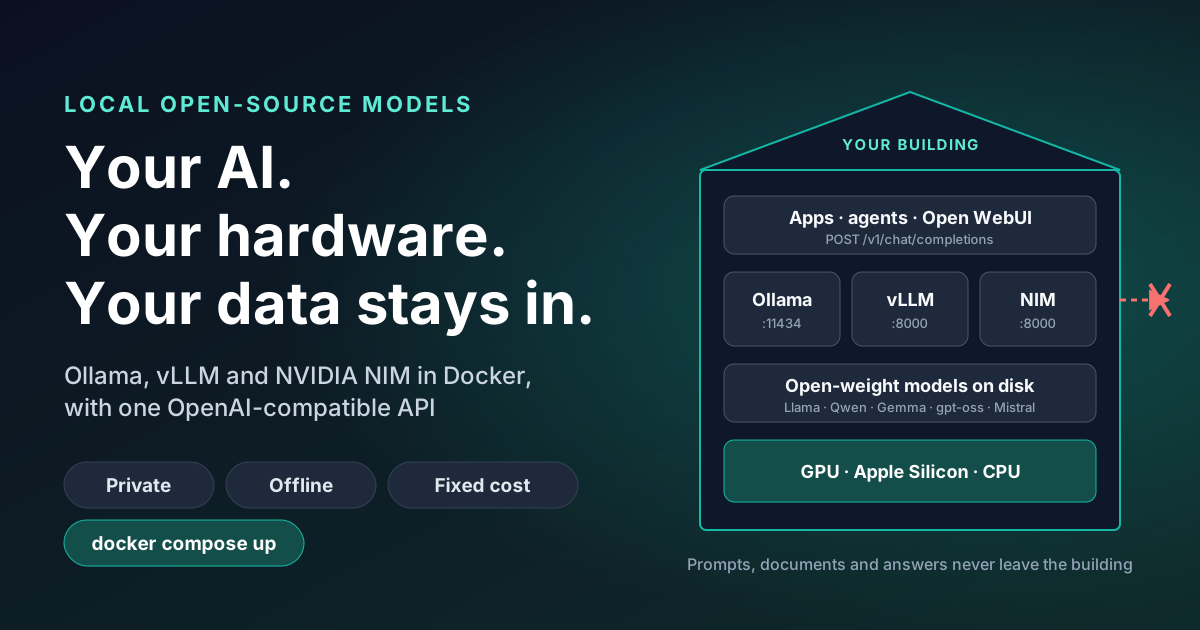
3. How a request flows
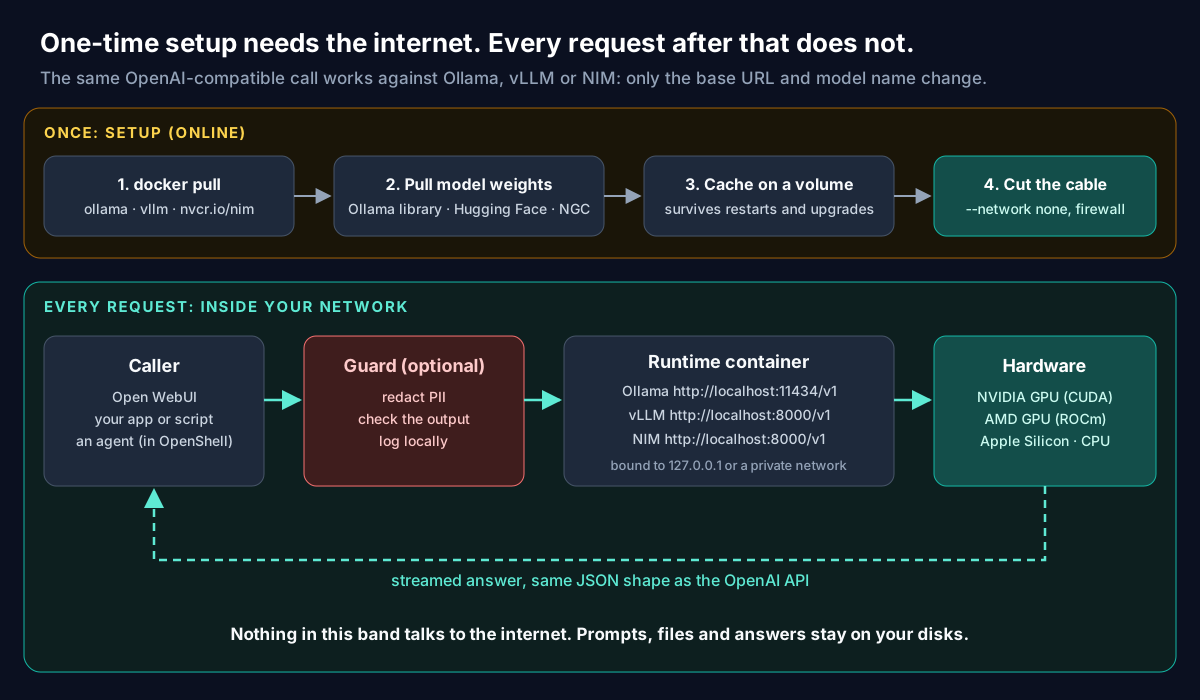
Two phases matter for privacy. Setup is online: you pull a container image and model weights, and cache the weights on a volume. Serving needs no internet at all. Once the weights are cached you can firewall the host or start the container with --network none, and every prompt, file and answer stays on your disks. Section 7 proves it.
4. Prerequisites
- Docker Engine or Docker Desktop with Compose.
- NVIDIA GPUs: a recent driver plus the NVIDIA Container Toolkit, registered with Docker (
sudo nvidia-ctk runtime configure --runtime=docker, then restart Docker). Our colleagues at Workstation have a full NVIDIA Container Toolkit guide covering apt, dnf, rootless Docker, containerd and Podman. - AMD GPUs: ROCm drivers on the host; the container gets
/dev/kfdand/dev/dri. - Macs: Docker on macOS runs a Linux VM that cannot use the Apple GPU. Containers fall back to CPU. For speed, run Ollama natively (
brew install ollamaor the app) and keep everything else, such as the UI, in Docker. We do exactly that below. - Memory: as a rough guide, a 4-bit quantised model needs a little over half its parameter count in gigabytes, so about 2 GB for a 3B model and 13 GB for a 20B model, plus room for context.
5. Deployment 1: Ollama in Docker
The commands from Ollama's Docker documentation. Pick the line for your hardware:
# CPU only
docker run -d -v ollama:/root/.ollama -p 11434:11434 --name ollama ollama/ollama

# NVIDIA GPU (needs the NVIDIA Container Toolkit)
docker run -d --gpus=all -v ollama:/root/.ollama -p 11434:11434 --name ollama ollama/ollama

# AMD GPU (ROCm)
docker run -d --device /dev/kfd --device /dev/dri -v ollama:/root/.ollama -p 11434:11434 --name ollama ollama/ollama:rocm
Pull and chat:
docker exec -it ollama ollama pull gemma3:1b
docker exec -it ollama ollama run gemma3:1b "Explain Docker volumes to a five-year-old."

# The same model over HTTP (OpenAI-compatible)
curl http://localhost:11434/v1/chat/completions \
  -H "Content-Type: application/json" \
  -d '{"model": "gemma3:1b", "messages": [{"role": "user", "content": "Hello from curl"}]}'
The ollama volume holds the weights, so upgrading the image keeps your models. Good starting tags in the Ollama library at the time of writing: gemma3:1b and gemma3:4b, llama3.2:3b, qwen3:4b and qwen3:8b for small machines; qwen3:14b, qwen3:30b and gpt-oss:20b when you have 16 GB or more of GPU memory. Check each model's licence before you ship it.
6. Deployment 2: a private ChatGPT with Open WebUI
This Compose file runs Ollama and Open WebUI together. Both ports are bound to 127.0.0.1, so nothing is exposed beyond the host until you choose to put a reverse proxy with authentication in front:
# compose.yaml
services:
  ollama:
    image: ollama/ollama:latest
    container_name: ollama
    volumes:
      - ollama:/root/.ollama
    ports:
      - "127.0.0.1:11434:11434"   # localhost only
    restart: unless-stopped
    # NVIDIA GPU: uncomment (needs the NVIDIA Container Toolkit)
    # deploy:
    #   resources:
    #     reservations:
    #       devices:
    #         - driver: nvidia
    #           count: all
    #           capabilities: [gpu]

  open-webui:
    image: ghcr.io/open-webui/open-webui:main
    container_name: open-webui
    depends_on:
      - ollama
    environment:
      - OLLAMA_BASE_URL=http://ollama:11434
    volumes:
      - open-webui:/app/backend/data
    ports:
      - "127.0.0.1:3000:8080"
    restart: unless-stopped

volumes:
  ollama:
  open-webui:
docker compose up -d
docker compose exec ollama ollama pull llama3.2:3b
open http://localhost:3000 # the first account you create becomes the adminOn a Mac, leave the ollama service out, run Ollama natively for the GPU, and point Open WebUI at the host:
docker run -d -p 127.0.0.1:3000:8080 \
  --add-host=host.docker.internal:host-gateway \
  -e OLLAMA_BASE_URL=http://host.docker.internal:11434 \
  -v open-webui:/app/backend/data --name open-webui \
  ghcr.io/open-webui/open-webui:main
That is the set-up in this screenshot: Open WebUI 0.13.3 in Docker, llama3.2:3b on native Ollama, on one Mac.
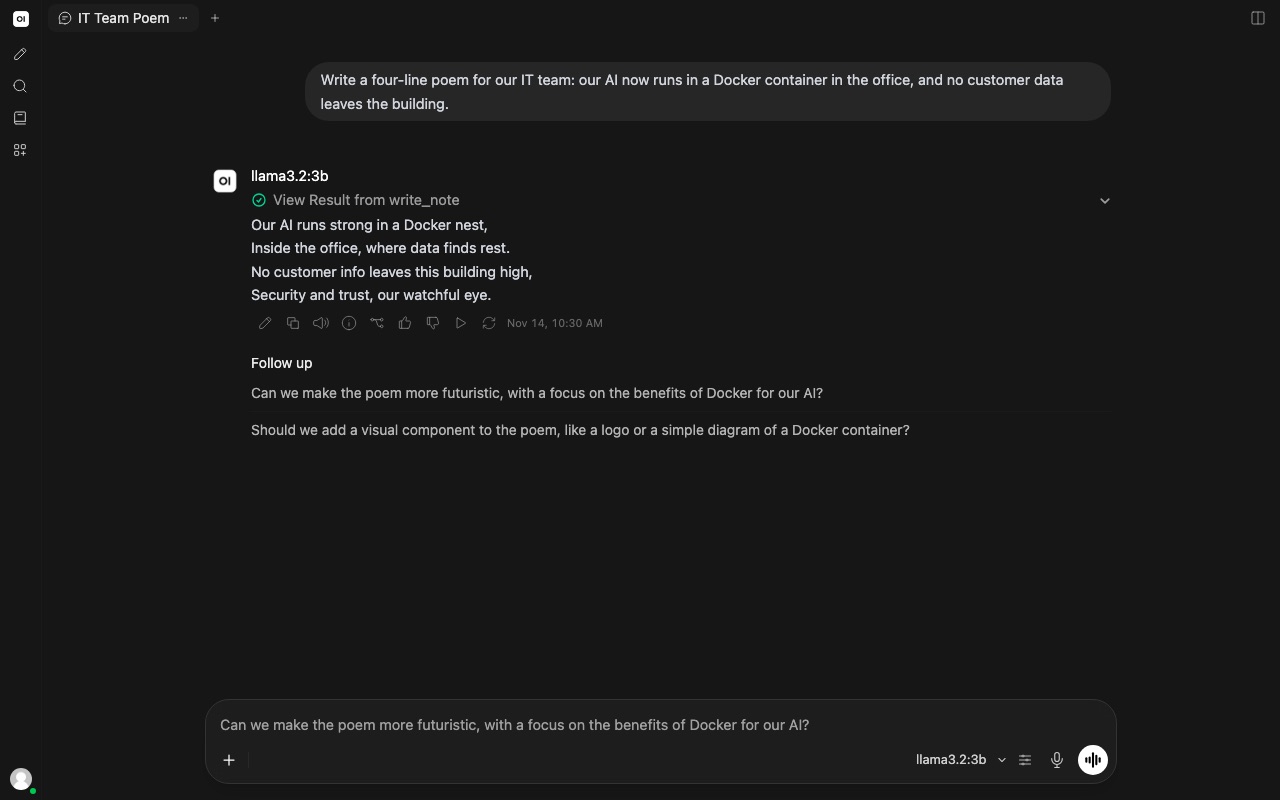
Two lessons from getting that screenshot, both worth knowing before you roll this out:
- Tool calling needs a model that supports tools. Recent Open WebUI versions send tool definitions with each chat. With
gemma3:1bthe reply was simply "does not support tools".llama3.2andqwen3handle it. - Those tool definitions are long. Our prompt grew to about 5,700 tokens. On a CPU-only container, prompt processing took over a minute and the request failed. On the Mac's GPU it answered in seconds. If users wait more than a few seconds, the problem is usually prompt length on slow hardware, not the model.
Licence note: Open WebUI is no longer MIT. Its current licence restricts changing or removing its branding, except for deployments with 50 or fewer users in a rolling 30-day period or with permission. Read it before white-labelling.
7. Deployment 3: prove it works with no network
The cleanest privacy guarantee is physical: a container with no network interface cannot send anything anywhere. Pull the model while online, then run a second container on the same volume with --network none:
# Online, once: download the weights into the volume
docker run -d -v ollama:/root/.ollama --name ollama ollama/ollama
docker exec ollama ollama pull gemma3:1b
docker rm -f ollama

# Offline, from now on: no network interface at all
docker run -d --network none -v ollama:/root/.ollama --name ollama-offline ollama/ollama
docker exec ollama-offline ollama run gemma3:1b "Reply with exactly: offline and working"
Our output, with docker inspect reporting NetworkMode: none:
offline and workingWe also ran the reverse: we disconnected a running container from its bridge network (docker network disconnect bridge ollama), confirmed DNS lookups failed, and asked why offline models help privacy. The answer came back in about six seconds on CPU:
"Running a model without a network connection minimizes the risk of data breaches and unauthorized access because it eliminates the potential for external connections and data transmission."
A container with no network can only be reached through docker exec on the host, which suits batch jobs and scripts. For an HTTP service, put the model and its callers on an internal Docker network (networks: { private: { internal: true } } in Compose) so they can talk to each other but not to the internet.
8. Deployment 4: vLLM for throughput
vLLM is built for serving many users from GPUs. PagedAttention and continuous batching keep the GPU busy across concurrent requests. The command from the vLLM Docker docs:
docker run --runtime nvidia --gpus all \
    -v ~/.cache/huggingface:/root/.cache/huggingface \
    --env "HF_TOKEN=$HF_TOKEN" \
    -p 8000:8000 \
    --ipc=host \
    vllm/vllm-openai:latest \
--model Qwen/Qwen3-0.6B- Mount the Hugging Face cache so weights download once.
HF_TOKENis only needed for gated models. --ipc=host(or a large--shm-size) is required because the workers share memory.- Everything after the image name is a vLLM argument:
--max-model-len,--tensor-parallel-size 2for two GPUs,--gpu-memory-utilization 0.9and so on. - Pin a version rather than
latestin production; v0.33.0 was current when we wrote this.
Test it exactly as you would OpenAI:
curl http://localhost:8000/v1/models
curl http://localhost:8000/v1/chat/completions -H "Content-Type: application/json" \
  -d '{"model": "Qwen/Qwen3-0.6B", "messages": [{"role": "user", "content": "One fun fact about llamas"}]}'
An honest note from our testing: vLLM also publishes a CPU image (vllm/vllm-openai-cpu, with an arm64 build). We tried it with Qwen/Qwen3-0.6B inside Docker Desktop's 16 GB Linux VM on a Mac, alongside other containers, and the engine failed to start twice, even with a 2 GB KV cache (VLLM_CPU_KVCACHE_SPACE=2). That matches the project's focus: for laptops and Macs use Ollama or llama.cpp, and keep vLLM for GPU servers.
9. Deployment 5: NVIDIA NIM
A NIM is a container that bundles one model with an inference engine NVIDIA has tuned for the GPU it finds, behind the same OpenAI-compatible API. You need an NGC API key (free with an NVIDIA Developer Program account) to pull images and weights. These steps follow NVIDIA's own NIM playbooks:
export NGC_API_KEY=<your NGC API key>
echo "$NGC_API_KEY" | docker login nvcr.io --username '$oauthtoken' --password-stdin

export LOCAL_NIM_CACHE=~/.cache/nim
mkdir -p "$LOCAL_NIM_CACHE"

docker run -it --rm --gpus all --shm-size=16GB \
  -e NGC_API_KEY \
  -v "$LOCAL_NIM_CACHE:/opt/nim/.cache" \
  -u $(id -u) \
  -p 8000:8000 \
  nvcr.io/nim/meta/llama-3.1-8b-instruct:latest
The '$oauthtoken' username is literal: type it exactly as shown, in single quotes. On first start the container downloads the weights into the cache and picks a profile for your GPU, so give it a few minutes. Then:
curl http://localhost:8000/v1/health/ready
curl http://localhost:8000/v1/chat/completions -H "Content-Type: application/json" \
  -d '{"model": "meta/llama-3.1-8b-instruct", "messages": [{"role": "user", "content": "Write a limerick about GPUs"}], "max_tokens": 80}'
Privacy note: a NIM needs the network to download its weights on first start. For air-gapped sites, NVIDIA documents filling the cache in advance and serving from it offline; check the current air-gap guide and your licence terms. We ran no NIM for this note, because our test Mac has no NVIDIA GPU; the commands are NVIDIA's.
10. Bonus: llama.cpp server, the smallest footprint
Ollama is built on llama.cpp. When you want just the server, with no model manager, use its image and a GGUF file:
docker run -v /path/to/models:/models -p 8080:8080 ghcr.io/ggml-org/llama.cpp:server \
  -m /models/your-model.gguf --port 8080 --host 0.0.0.0 -n 512
It also serves an OpenAI-compatible API, on port 8080.
11. One client for every backend
Because all of these speak the OpenAI API, application code does not care which one is running. Switch with two environment variables:
import os
from openai import OpenAI

# Ollama: http://localhost:11434/v1   vLLM or NIM: http://localhost:8000/v1
client = OpenAI(base_url=os.getenv("LLM_BASE_URL", "http://localhost:11434/v1"), api_key="local")
model = os.getenv("LLM_MODEL", "llama3.2:3b")

reply = client.chat.completions.create(
    model=model,
    messages=[{"role": "user", "content": "Give our office Wi-Fi a funny, safe-for-work network name. Reply with the name only."}],
    temperature=0.9,
)
print(reply.choices[0].message.content)
Two runs against llama3.2:3b on Ollama, with the official openai Python package (3.51.0) unchanged:
"Parking Permit Zone"
"Coffee Fuels Productivity"
The API key is required by the client library but ignored by Ollama. vLLM and NIM accept a key too. Set one (vLLM's --api-key) as soon as the endpoint is reachable from anything other than localhost.
12. Fun examples that are secretly useful
Captain Diff, the pirate code reviewer
An Ollama Modelfile bakes a system prompt and parameters into a named model that the whole team can call:
FROM qwen3:4b-instruct-2507-q4_K_M
PARAMETER temperature 0.4
SYSTEM """You are Captain Diff, a pirate who reviews code. Speak like a pirate, but give precise, correct review comments. Reply with at most three bullet points: one bug, one risk, one praise."""
ollama create pirate-reviewer -f Modelfile
printf 'Review this Python:\n\n%s' "$(cat average.py)" | ollama run pirate-reviewerGiven a five-line average(xs) function that divides by len(xs), the captain said:
Bug: If
xsis empty, you'll divide by zero — that's a surefire way to sink a ship. Need a check before the division.
Risk: No error handling for non-numeric values — if someone throws in a string orNone, the code'll crash like a rotten cannon.
Praise: Clean and simple — a true pirate's code, short and sharp. Just needs a bit of armor to survive the rough seas.
Silly voice, correct review, and your source code never left the laptop. Swap the persona for "senior security reviewer" and wire it into a pre-commit hook.
The redaction bouncer
Ollama can force the reply to match a JSON Schema through the format field. Here a local model redacts personal data from a support email and classifies it, so the cleaned text can safely go to a ticketing system or a cloud model:
POST http://localhost:11434/api/chat
{
  "model": "qwen3:4b-instruct-2507-q4_K_M",
  "stream": false,
  "options": { "temperature": 0 },
  "format": {
    "type": "object",
    "properties": {
      "redacted_text": { "type": "string" },
      "intent":   { "type": "string", "enum": ["refund", "complaint", "question", "other"] },
      "order_id": { "type": "string" },
      "pii_found": { "type": "array", "items": { "type": "string", "enum": ["name", "email", "phone", "address"] } }
    },
    "required": ["redacted_text", "intent", "order_id", "pii_found"]
  },
  "messages": [
    { "role": "system", "content": "Replace every personal name, email, phone number and postal address with [NAME], [EMAIL], [PHONE] or [ADDRESS]. Keep everything else unchanged." },
    { "role": "user", "content": "Hi team, please refund order 48213 for Priya Sharma (priya.sharma@example.com, 07700 900123). She lives at 14 Elm Road, Leeds LS6 2AB and says the blender arrived cracked. Thanks, Tom" }
  ]
}
The reply (the email address and phone number above are reserved example values):
{
  "intent": "refund",
  "order_id": "48213",
  "pii_found": ["name", "email", "phone", "address"],
  "redacted_text": "Hi team, please refund order 48213 for [NAME] ([EMAIL], [PHONE]). She lives at [ADDRESS] and says the blender arrived cracked. Thanks, Tom"
}
Spot the miss: "Thanks, Tom" survived. The customer's details were caught, but the staff member's name in the sign-off was not. That is the real lesson. A model is a good first pass, not a guarantee. Add a deterministic second pass for anything with a pattern:
import re

PATTERNS = {
    "[EMAIL]": r"[\w.+-]+@[\w-]+\.[\w.-]+",
    "[PHONE]": r"(?:\+44\s?7\d{3}|\b07\d{3})\s?\d{3}\s?\d{3}\b",
    "[POSTCODE]": r"\b[A-Z]{1,2}\d[A-Z\d]?\s?\d[A-Z]{2}\b",
}

def backstop(text: str) -> tuple[str, list[str]]:
    """Second, deterministic pass after the model. Returns the text and what it had to fix."""
    fixed = []
    for tag, pattern in PATTERNS.items():
        text, n = re.subn(pattern, tag, text)
        if n:
            fixed.append(f"{tag} x{n}")
    return text, fixed

# A bad day: the model missed the phone number and the postcode.
backstop("Refund order 48213 for [NAME] ([EMAIL], 07700 900123), [ADDRESS] LS6 2AB. Thanks, Tom")
# → ('Refund order 48213 for [NAME] ([EMAIL], [PHONE]), [ADDRESS] [POSTCODE]. Thanks, Tom',
#    ['[PHONE] x1', '[POSTCODE] x1')
Regular expressions catch emails, phone numbers and postcodes every time, but still not "Tom". Names need a list of known staff and customer names, or a dedicated entity-recognition model, and a person checking samples. Log what the backstop had to fix: it tells you how often the model misses.
Commit-log haiku for the stand-up
Pipe anything into a local model. This one reads the last twelve commits of the repository that publishes this site:
git log --oneline -12 --no-merges | ollama run llama3.2:3b \
  "Write one haiku about this week's work in this git log. Output only the haiku."
Agents built with care
Code and tales of AI dawn
Innovation unfurlsNot Bashō, but commit messages can name customers, incidents and unreleased products, and this summary never left the machine. The same pipe works for release notes, changelog drafts and "what did I do this week" reports.
Name the Wi-Fi
The client example in section 11 is the low-stakes way to show a sceptical colleague that local models are real. Two runs gave "Parking Permit Zone" and "Coffee Fuels Productivity". Your mileage, and your Wi-Fi name, will vary.
13. Measure your own speed
Throughput depends on your GPU, memory bandwidth, quantisation, context length and what else the machine is doing, so measure on your own hardware rather than trusting anyone's table, including ours. Ollama returns the timings with every response:
import json, urllib.request

def chat(model, prompt):
    body = {"model": model, "stream": False, "options": {"temperature": 0.2},
            "messages": [{"role": "user", "content": prompt}]}
    req = urllib.request.Request("http://localhost:11434/api/chat", data=json.dumps(body).encode(),
                                 headers={"Content-Type": "application/json"})
    return json.load(urllib.request.urlopen(req, timeout=600))

prompt = "Explain in about 120 words why a small business might run an AI model on its own computer."
for model in ["llama3.2:3b", "qwen3:4b", "gpt-oss:20b"]:
    chat(model, "hi")                      # load the model first
    r = chat(model, prompt)
    gen = r["eval_count"] / (r["eval_duration"] / 1e9)
    pre = r["prompt_eval_count"] / (r["prompt_eval_duration"] / 1e9)
    print(f"{model:14} {gen:6.1f} tok/s generated   {pre:7.1f} tok/s prompt")
Run it twice and keep the second result. The first includes loading the model into memory. For vLLM and NIM, measure with concurrent requests: their advantage shows when many users call at once, not in a single-user loop.
14. Privacy hardening checklist
- Bind to localhost (
127.0.0.1:11434:11434) or an internal Docker network. Never publish port 11434 to the internet: Ollama's API has no authentication of its own. - Authenticate at the edge. When other machines need access, put a reverse proxy with authentication, TLS and rate limits in front, such as Proxy10x.
- Cut egress after setup with
--network none, an internal network or host firewall rules, and pre-pull every model you need. - Pin versions of images and model tags, and record model digests, so an update never changes behaviour silently.
- Pull from known registries (the Ollama library, verified Hugging Face organisations, NGC) and check each model's licence.
- Treat chat history as data. Open WebUI stores conversations in its volume. Set retention, back it up encrypted, and include it in subject-access and deletion processes.
- Redact before anything leaves: model first, deterministic backstop second, human sampling third.
- Sandbox agents. A local model behind an agent that can run code still needs runtime limits. Run the agent in OpenShell and give it a provider that points at your local endpoint.
15. Limits
- Small local models are fast and private, but they make more mistakes than frontier models. The redaction example missed a name. Design for verification.
- Docker on macOS and Windows cannot use the Apple GPU. Run Ollama natively there.
- vLLM and NIM want NVIDIA GPUs for real work. NIM is licensed for production use.
- Long system prompts and tool definitions dominate latency on slow hardware.
- Versions move quickly. Ollama 0.40.16, vLLM 0.33.0 and Open WebUI 0.13.3 were current when we wrote this in November 2026.
16. References
- Ollama Docker documentation and OpenAI compatibility; github.com/ollama/ollama (MIT)
- vLLM: using Docker; github.com/vllm-project/vllm (Apache 2.0)
- NVIDIA NIM for LLMs: getting started and NVIDIA's NIM playbooks
- llama.cpp Docker documentation
- Open WebUI and its licence
Want a private model stack sized for your data, with the hardware to match? Contact us. Our sister brand Workstation builds the machines. See also our AI agents services.
Ollama, vLLM, NVIDIA and NIM are trademarks of their respective owners. The Ollama and vLLM logos are taken from the projects' public GitHub repositories. The NIM badge is our own text illustration, not an NVIDIA logo.