Every request Claude Code sends carries the whole conversation: the system prompt, the tool definitions, your CLAUDE.md, every message and every tool result so far. Prompt caching is what stops you paying full price to re-send all of that on every turn. Read from the cache, input costs a tenth of the normal price or less, and the answer starts sooner. This note explains how caching works in our own words, shows what quietly breaks it in Claude Code, and gives copy-and-paste code for getting the same savings in your own applications on the Claude API.
/clear between unrelated tasks, /compact at natural breaks, and check the Prompt cache (main) line in /usage. In your own code, add one top-level cache_control field, keep the start of the prompt byte-for-byte stable, and watch usage.cache_read_input_tokens.
1. How prompt caching works
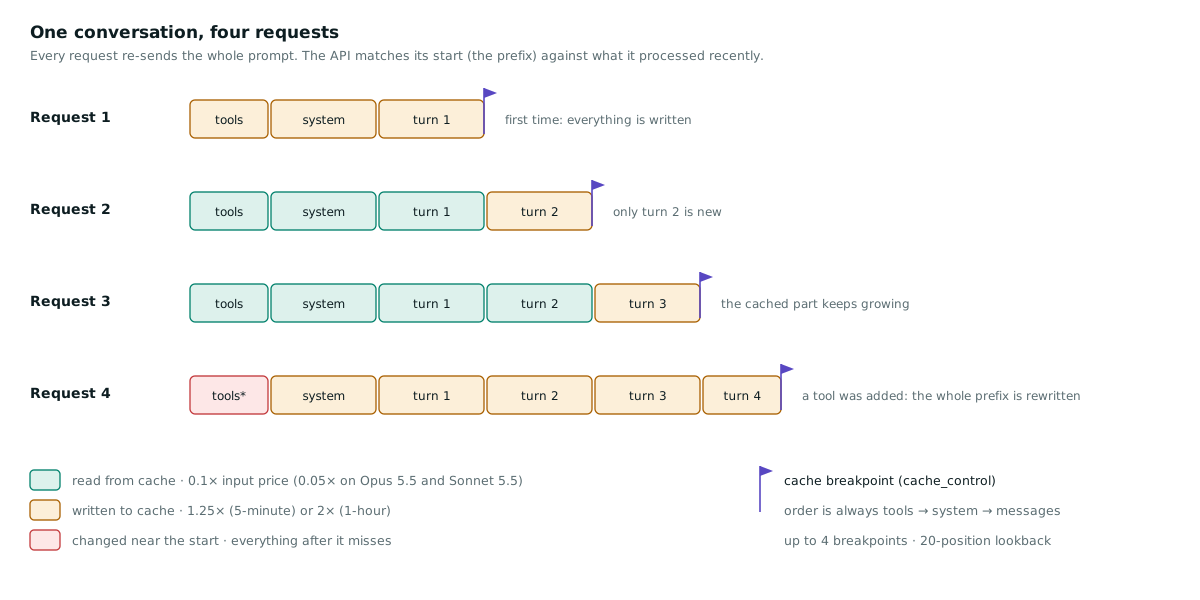
The model keeps no memory between requests, so a chat or an agent loop re-sends everything each turn. Most of each request is the same as the one before it, with something new on the end. The API takes advantage of that:
- The prompt is rendered in a fixed order:
tools, thensystem, thenmessages. - A cache breakpoint (a
cache_controlmarker) tells the API to store the processed prompt up to that point. You can have up to 4 per request. - On the next request, the API looks for a stored prefix that matches exactly, walking back at most 20 positions from each breakpoint. On the Claude API, a run of consecutive
tool_useblocks counts as one position, and so does a run oftool_resultblocks. - The match is exact. One different byte (a timestamp, a reordered JSON key, a new tool) and everything after that point is processed again and written again.
- The answer does not change. Anthropic states that the response is identical to what you would get without caching. Only cost and speed change.
- Caches are private. They are never shared between organisations. On the Claude API they are also separate per workspace.
What it costs
Prices are relative to the model's normal input price:
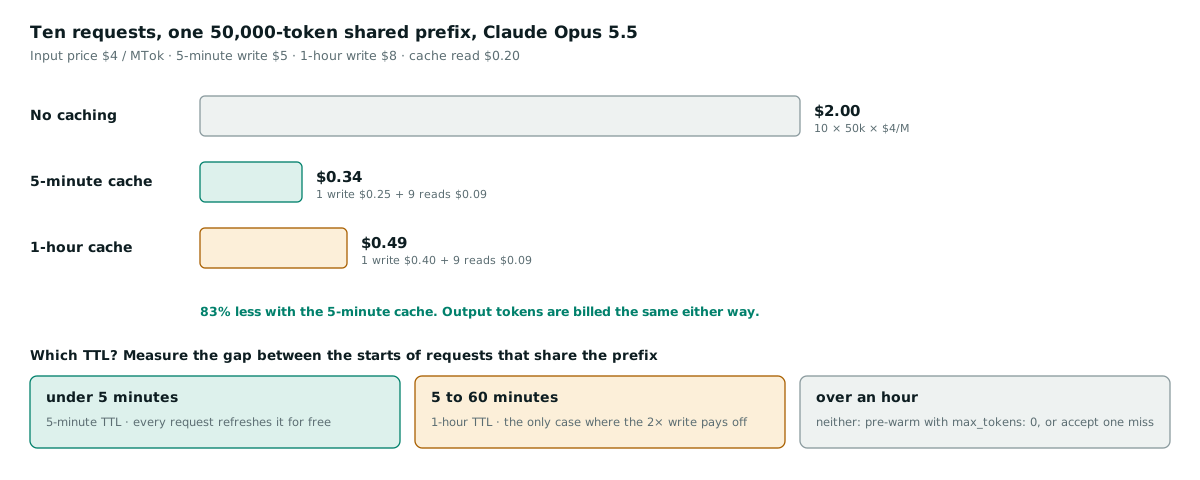
- Writing to the cache costs 1.25× with the default 5-minute lifetime, or 2× with the 1-hour lifetime.
- Reading from the cache costs 0.1×. It is cheaper still on the newest models: 0.05× on Claude Opus 5.5 and Claude Sonnet 5.5, and 0.025× on Claude Fable 5.1.
- Output tokens are billed as normal.
| Model (per million tokens) | Input | 5-minute write | 1-hour write | Cache read | Output |
|---|---|---|---|---|---|
| Claude Fable 5.1 | $10 | $12.50 | $20 | $0.25 | $50 |
| Claude Opus 5.5 | $4 | $5 | $8 | $0.20 | $20 |
| Claude Sonnet 5.5 | $2 | $2.50 | $4 | $0.10 | $10 |
| Claude Haiku 5.5 (prompts up to 100,000 tokens) | $0.10 | $0.125 | $0.20 | $0.01 | $0.50 |
When it pays off.
- 5-minute cache: two requests already come out ahead. You pay 1.25× + 0.1× = 1.35× of the input price, against 2× for two uncached requests.
- 1-hour cache: you need at least three requests, because the write costs twice as much.
On the Claude API, cache reads also do not count towards input-token rate limits on most models, so a well-cached workload gets more throughput as well as a smaller bill.
The minimum size. A prefix shorter than the model's minimum is not cached at all, and no error is returned:
- 512 tokens on Claude Opus 5.5, Opus 5, Sonnet 5.5, Haiku 5.5 and the Fable models
- 1,024 tokens on Opus 4.8, Sonnet 5 and Sonnet 4.6
- 2,048 tokens on Opus 4.7
- 4,096 tokens on Opus 4.6, Opus 4.5 and Haiku 4.5
The two lifetimes (TTL)
An entry lives for 5 minutes by default, or 1 hour if you ask for it. Every cache hit resets the timer at no cost.
The timer runs from the start of the request that wrote or read the entry. That means a 4-minute generation leaves about one minute for the next request to start before a 5-minute entry expires.
Choose the lifetime by the gap between the starts of requests that share the prefix:
- Under 5 minutes: use the 5-minute TTL, which is the cheaper option.
- 5 to 60 minutes: use the 1-hour TTL.
- Longer than an hour: neither lifetime helps.
2. Prompt caching in Claude Code
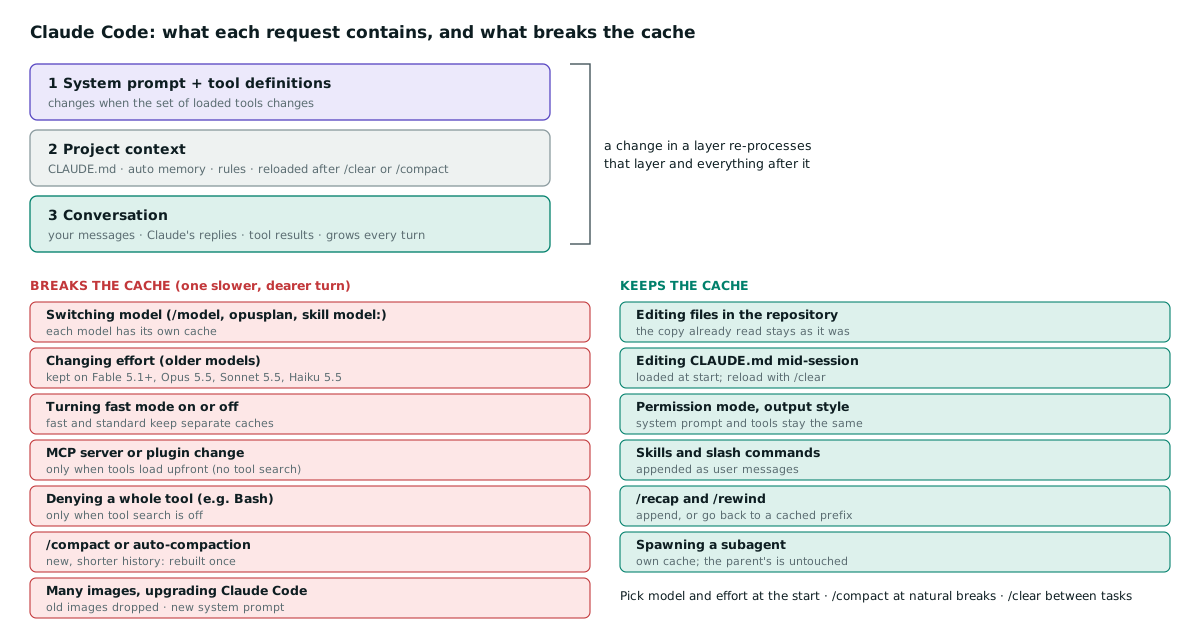
Claude Code turns caching on for you and orders each request so that what rarely changes comes first:
- The system prompt and tool definitions. These change when the set of loaded tools changes.
- Project context: CLAUDE.md, auto memory and unscoped rules. These are reloaded at the start of a session and after
/clearor/compact. - The conversation. This grows every turn.
A new turn only adds to layer 3, so layers 1 and 2 stay cached. Your job is to avoid the actions that rebuild the prefix from the top.
This matters for the bill. Anthropic reports an average enterprise cost of about $13 per developer per active day, or $150 to $250 a month. Long sessions and cache misses are the usual reasons a session costs more than its activity suggests.
What breaks the cache
Each of these gives you one slower, more expensive turn while the cache is rebuilt:
- Switching model. Each model has its own cache, so
/modelmeans the next request reads the whole history uncached. Three less obvious cases do the same:- the
opusplansetting switches between Opus (plan mode) and Sonnet, so every plan-mode toggle is a switch; - a skill whose frontmatter names a different
modelswitches for that turn; - an automatic fallback to another model after a safety classifier declines a request is also a switch.
- the
- Changing effort mid-session rebuilds the cache on most models. With an API key or a Claude subscription, Fable 5.1 and later, Opus 5.5, Sonnet 5.5 and Haiku 5.5 keep it.
- Turning fast mode on or off. Fast and standard speed keep separate caches, so turn fast mode on at the start of a session if you plan to use it.
- Connecting or removing an MCP server, or a plugin that provides one, but only when tools are loaded upfront. MCP tool search, the default on supported models, defers MCP tools and keeps the first request's tool list for the whole conversation, so the cache survives.
- Denying a whole tool (a bare
Bashdeny rule, for example), again only when tool search is off. Scoped rules such asBash(rm *)never affect the cache. - Compaction.
/compactreplaces the history with a summary, so the conversation layer is rebuilt once.- Warm cache: the summarising request reads your prefix from the cache, so it is cheap.
- Cold cache: after a long break, it reprocesses the whole history uncached. That is why compacting an old resumed session is the most expensive case.
- Accumulating many images. When a request would pass the image or PDF limits, Claude Code drops a batch of the oldest ones, which changes earlier messages.
- Upgrading Claude Code. A new version usually changes the system prompt, so the first session after an upgrade starts cold. Updates are applied on the next launch, never mid-session.
What keeps the cache
- Editing files in your repository. The copy Claude already read stays as it was in the conversation.
- Editing CLAUDE.md mid-session. It is read at the start and held in memory. Run
/clearor/compactto load your edits. - Changing permission mode or output style. The new output style arrives as a message.
- Invoking skills and slash commands. These are appended as messages, unless their frontmatter names a model.
- Plan mode. Its instructions are appended as messages.
/recapand/rewind. Rewinding goes back to a prefix that is already cached, so to abandon a wrong path,/rewindis cheaper than/compact.- Spawning a subagent. It builds its own cache, and the parent's prefix is untouched. A fork of the conversation inherits the parent's prefix and reads its cache.
Check your hit rate
Run /usage. After the first response, the Session block includes a Prompt cache (main) line (Claude Code v2.1.251 or later). It looks like this:
Prompt cache (main): 14 requests · 91% of input tokens from cache · 2 misses (last 6m 10s ago, 310.2k tokens re-cached) · 1 expected rebuild (compaction or tool-result clearing) · warm (1h TTL, last activity 40s ago)From v2.1.260 the line names the likely cause of the last miss, for example likely cause: tool definitions changed. On a paid plan, /usage also shows the following, and pressing f applies the recommendations it can:
- which skills, subagents, plugins and MCP servers used your tokens;
- recommendations such as
Trim ~/code/api/CLAUDE.md · 49k tokens per request.
To see the raw numbers for one request from a script:
claude -p "hello" --output-format json \
  | jq '.usage | {input_tokens, cache_creation_input_tokens, cache_read_input_tokens, cache_creation}'
Inside cache_creation, ephemeral_1h_input_tokens means the 1-hour TTL was used and ephemeral_5m_input_tokens means the 5-minute one.
Choose the cache lifetime
Claude Code picks the TTL itself:
- Subscription plan, within its included usage: the main conversation gets the 1-hour TTL. Subagents, workflows, compaction and session titles get 5 minutes.
- API key, cloud provider, or usage credits: everything gets 5 minutes.
If you work with an API key and often step away for coffee or a meeting mid-task, the 1-hour TTL usually pays for itself. Set it in ~/.claude/settings.json (Claude Code v2.1.242 or later):
{
  "promptCacheTtl": "1h",
  "subagentPromptCacheTtl": "5m"
}
Or for one shell:
export CLAUDE_CODE_PROMPT_CACHE_TTL=1h            # main conversation
export CLAUDE_CODE_SUBAGENT_PROMPT_CACHE_TTL=5m   # subagents, workflows, compaction
# ENABLE_PROMPT_CACHING_1H=1 asks for 1 hour everywhere;
# FORCE_PROMPT_CACHING_5M=1 forces 5 minutes everywhere (useful when debugging)
A team can set these for everyone in the env block of managed settings.
Caching can be turned off with DISABLE_PROMPT_CACHING=1, or per model family with DISABLE_PROMPT_CACHING_HAIKU, _SONNET, _OPUS or _FABLE. That is only for debugging; leave it on otherwise.
If you route Claude Code through an LLM gateway, make sure the gateway passes on cache_control and the anthropic-beta header unchanged. A gateway that strips the markers but still answers successfully bills your whole history as uncached input on every turn.
Habits that cut Claude Code usage
- Decide the model and effort first, and do not change them mid-task.
/clearbetween unrelated tasks. Stale context is re-read on every turn, and/clearcosts nothing. Use/renamefirst if you want to/resumethe session later./compactat natural breaks, not mid-task, and tell it what to keep, for example/compact Focus on the failing tests and the API changes. You can put standing instructions in CLAUDE.md:# Compact instructions When you are using compact, please focus on test output and code changes- Keep CLAUDE.md short (Anthropic suggests under 200 lines). Move workflow-specific instructions into skills, which load only when used.
- Prefer CLI tools over MCP servers where they exist (
gh,aws,gcloud). Disable MCP servers you are not using with/mcp, and check what fills the context with/context. - Send noisy work to a subagent, so test runs, log reading and documentation fetches stay out of the main context. Give simple subagents a smaller model:
--- name: test-runner description: Runs the test suite and reports only the failures model: haiku --- - Trim tool output with a hook. The Claude Code docs include a
PreToolUsehook that keeps only the last 100 lines ofnpm test,pytestorgo testoutput, which cuts thousands of tokens down to hundreds. - Write specific prompts. "Add input validation to the login function in auth.ts" reads a few files. "Improve this codebase" scans many.
- Watch idle background work. Each of these sends the full context while you are away:
- scheduled
/looptasks; - goal check-ins;
- messages from other sessions;
- idle compaction.
- scheduled
3. Prompt caching in your own code (Claude API)
The same rules apply when you build on the API. The examples use the official Python SDK (pip install anthropic) and Claude Opus 5.5.
Automatic caching: one field
Add cache_control at the top level of the request. The API puts the breakpoint on the last block it can cache and moves it forward as the conversation grows. It uses one of the four breakpoint slots.
import anthropic

client = anthropic.Anthropic()  # reads ANTHROPIC_API_KEY

SYSTEM_PROMPT = open("prompts/support-agent.md").read()  # large and stable

response = client.messages.create(
    model="claude-opus-5-5",
    max_tokens=16000,
    cache_control={"type": "ephemeral"},  # automatic caching, 5-minute TTL
    system=SYSTEM_PROMPT,
    messages=[{"role": "user", "content": "Summarise ticket #4821"}],
)
print(response.usage)
The same in TypeScript (npm install @anthropic-ai/sdk):
import Anthropic from "@anthropic-ai/sdk";

const client = new Anthropic();

const response = await client.messages.create({
  model: "claude-opus-5-5",
  max_tokens: 16000,
  cache_control: { type: "ephemeral" },
  system: SYSTEM_PROMPT,
  messages: [{ role: "user", content: "Summarise ticket #4821" }],
});

const u = response.usage;
console.log({ read: u.cache_read_input_tokens, written: u.cache_creation_input_tokens, uncached: u.input_tokens });
Automatic caching is not accepted on the Amazon Bedrock bedrock-runtime endpoint. Use explicit breakpoints there.
Explicit breakpoints: a shared prefix with a different question each time
If every request ends with something unique, such as retrieved rows or the user's question, automatic caching puts the breakpoint after that unique part. You then pay the write premium every time and never read it back. Put the marker at the end of the shared part instead:
def ask(question: str, handbook: str) -> anthropic.types.Message:
    return client.messages.create(
        model="claude-opus-5-5",
        max_tokens=16000,
        system=[{"type": "text", "text": SYSTEM_PROMPT}],
        messages=[{
            "role": "user",
            "content": [
                # Shared by every request: cache up to and including this block
                {"type": "text", "text": handbook, "cache_control": {"type": "ephemeral"}},
                # Different every time: after the breakpoint, so it is never written
                {"type": "text", "text": question},
            ],
        }],
    )
The same shape over raw HTTP:
curl https://api.anthropic.com/v1/messages \
  -H "x-api-key: $ANTHROPIC_API_KEY" \
  -H "anthropic-version: 2026-10-21" \
  -H "content-type: application/json" \
  -d '{
    "model": "claude-opus-5-5",
    "max_tokens": 16000,
    "system": [
      {"type": "text", "text": "You answer questions about the attached handbook.",
       "cache_control": {"type": "ephemeral", "ttl": "1h"}}
    ],
    "messages": [{"role": "user", "content": "What is the refund window?"}]
  }'
Agent loops: one fixed breakpoint and one moving one
For a tool-using agent, put an explicit breakpoint on the static system prompt and let automatic caching follow the growing conversation. The expensive shared part always has a read point, whatever happens later in messages.
TOOLS = sorted(load_tools(), key=lambda t: t["name"])  # same tools, same order, every request

def agent_turn(history: list[dict]) -> anthropic.types.Message:
    return client.messages.create(
        model="claude-opus-5-5",
        max_tokens=16000,
        tools=TOOLS,
        system=[{"type": "text", "text": SYSTEM_PROMPT,
                 "cache_control": {"type": "ephemeral"}}],   # caches tools + system
        cache_control={"type": "ephemeral"},                  # follows the conversation
        messages=history,
    )
Two TTL rules apply here:
- If you move to the 1-hour TTL, set
"ttl": "1h"on both the explicit marker and the top-level field. An entry with the longer TTL must come before entries with the shorter one. - If one turn adds more than 20 positions (a long sequential tool loop, for example), add an intermediate breakpoint so the next request can still find the previous entry.
Measure it: hit rate and cost per request
The usage object is the only reliable evidence that caching works:
input_tokenscounts only what came after the last breakpoint.- The full prompt is
input_tokens + cache_creation_input_tokens + cache_read_input_tokens.
# Prices per million tokens; check the pricing page before you rely on them.
PRICES = {
    "claude-opus-5-5":   {"input": 4.00, "write_5m": 5.00,  "write_1h": 8.00, "read": 0.20, "output": 20.00},
    "claude-sonnet-5-5": {"input": 2.00, "write_5m": 2.50,  "write_1h": 4.00, "read": 0.10, "output": 10.00},
    "claude-haiku-5-5":  {"input": 0.10, "write_5m": 0.125, "write_1h": 0.20, "read": 0.01, "output": 0.50},  # prompts up to 100k
}

def cache_report(model: str, usage) -> dict:
    p = PRICES[model]
    created = usage.cache_creation_input_tokens or 0
    read = usage.cache_read_input_tokens or 0
    split = usage.cache_creation  # per-TTL breakdown of what was written
    w5 = (split.ephemeral_5m_input_tokens or 0) if split else created
    w1 = (split.ephemeral_1h_input_tokens or 0) if split else 0
    total_in = usage.input_tokens + created + read
    cost = (usage.input_tokens * p["input"] + w5 * p["write_5m"] + w1 * p["write_1h"]
            + read * p["read"] + usage.output_tokens * p["output"]) / 1_000_000
    no_cache = (total_in * p["input"] + usage.output_tokens * p["output"]) / 1_000_000
    return {
        "prompt_tokens": total_in,
        "hit_rate": round(read / total_in, 3) if total_in else 0.0,
        "cost_usd": round(cost, 5),
        "saved_usd": round(no_cache - cost, 5),
    }

print(cache_report("claude-opus-5-5", response.usage))
A healthy agent loop looks like this from turn to turn:
cache_read_input_tokensgrows with the conversation.cache_creation_input_tokensstays small: roughly the last reply plus the new input.input_tokenscovers only the tail.
If writes are close to the whole conversation on every turn, something upstream is changing the prefix.
Guard it in CI
Caching rarely fails loudly. Requests keep succeeding and the bill quietly grows after someone adds a timestamp to the system prompt. A small test catches that regression:
def test_system_prompt_is_cached():
    kwargs = dict(
        model="claude-opus-5-5",
        max_tokens=16000,
        system=[{"type": "text", "text": build_system_prompt(),
                 "cache_control": {"type": "ephemeral"}}],
        messages=[{"role": "user", "content": "ping"}],
    )
    client.messages.create(**kwargs)           # writes the entry
    second = client.messages.create(**kwargs)  # must read it
    assert second.usage.cache_read_input_tokens > 0, "prompt prefix is not stable"
The test makes two real API calls, so run it in a scheduled job rather than on every commit. The prompt must be longer than the model's minimum cacheable length.
Silent cache breakers, and the fix for each
| Pattern | Why it misses | Fix |
|---|---|---|
f"Today is {datetime.now()}" in the system prompt | The very first block differs on every request | Put the date in the latest user message, after the breakpoint |
| A request ID or UUID early in the prompt | Every request is unique | Send it as metadata or a header, not in the prompt |
json.dumps(d) or iterating a set | Key order can change, so the bytes change | json.dumps(d, sort_keys=True); sort lists. Go and Swift randomise map order, so sort there too. |
| A per-user tool list | Tools come first, so nothing is shared between users | One fixed tool list, sorted by name; enforce permissions inside the tools |
Editing the top-level system mid-conversation | Everything after it, including the whole history, is reprocessed | Append a {"role": "system"} message instead (see below) |
| Switching model, effort or thinking settings per request | Caches are per model, and these settings are part of the prompt | Fix them per route; use a subagent on a cheaper model for side tasks |
| Many identical requests fired in parallel | An entry is readable only after the first response starts, so all of them pay full price | Send one first, then the rest (see below) |
The API's own rule of thumb is to ask what a change touches:
- Changing tool definitions or the model rebuilds everything.
- Changing
tool_choiceor adding images rebuilds only the messages. - Changing message content never touches the cached tools and system prompt.
Change instructions without losing the cache
On Claude Opus 5.5, Opus 5, Opus 4.8, Sonnet 5.5, Haiku 5.5 and the Fable models, you can add an operator instruction mid-conversation as a system message. You do not need a beta header. The cached system prompt and history stay intact:
history.append({"role": "user", "content": "Draft the reply to the customer."})
history.append({"role": "system", "content": "From now on, reply in British English and keep answers under 120 words."})

response = client.messages.create(
    model="claude-opus-5-5",
    max_tokens=16000,
    system=[{"type": "text", "text": SYSTEM_PROMPT, "cache_control": {"type": "ephemeral"}}],
    messages=history,
)
A system message must follow a user message and cannot be the first message. Models that do not support it return a 400.
Warm the cache before traffic arrives
A request with max_tokens=0 writes the cache and returns straight away, without billing any output tokens. Send one at start-up or after a deploy, so the first real user does not wait for a cold prefix:
client.messages.create(
    model="claude-opus-5-5",
    max_tokens=0,                       # prefill only: writes the cache, no output
    system=[{"type": "text", "text": SYSTEM_PROMPT,
             "cache_control": {"type": "ephemeral"}}],   # marker on the shared part
    messages=[{"role": "user", "content": "warmup"}],
)
Three things to get right:
- Marker position: put the marker on the last block your real traffic shares, not on the placeholder message.
- Matching settings: send the same thinking and effort settings as real requests.
- What it can't be combined with:
max_tokens=0is rejected with streaming, structured outputs and inside Message Batches.
Skip pre-warming when traffic is continuous; the first real request warms the cache anyway.
Fan-out: one first, then the rest
from concurrent.futures import ThreadPoolExecutor

def review(doc: str) -> anthropic.types.Message:
    return ask(f"List the risks in this contract clause:\n\n{doc}", handbook=LEGAL_HANDBOOK)

first = review(clauses[0])        # writes the shared handbook prefix
with ThreadPoolExecutor(max_workers=8) as pool:
    rest = list(pool.map(review, clauses[1:]))   # all read it
results = [first, *rest]
Strictly, the entry becomes readable once the first response starts streaming, so with streaming you can launch the rest as soon as the first event arrives.
Find what broke the cache
If cache_read_input_tokens drops to zero, log two consecutive request bodies, remove the cache_control markers and diff them. The first difference before the newly added turn is the culprit.
On the Claude API, the cache diagnostics beta does this comparison for you. Send the beta header on every request, and pass the previous response's ID on the next one:
prev_id = None
for user_text in turns:
    history.append({"role": "user", "content": user_text})
    r = client.beta.messages.create(
        betas=["cache-diagnosis-2026-04-07"],
        diagnostics={"previous_message_id": prev_id},
        model="claude-opus-5-5",
        max_tokens=16000,
        cache_control={"type": "ephemeral"},
        system=SYSTEM_PROMPT,
        messages=history,
    )
    print(r.diagnostics)   # names where this request diverged from the previous one
    history.append({"role": "assistant", "content": r.content})
    prev_id = r.id
4. Checklist
- Stable first, changing last. Keep tools and the system prompt identical byte for byte. Put dates, IDs and the question at the end.
- One cache-control field for chats and agents. Use explicit breakpoints where a shared prefix is followed by a unique tail.
- One model and one effort level per conversation. In Claude Code, choose them before you start.
- Choose the TTL by the gap between requests. Use 5 minutes for continuous work and 1 hour for gaps of 5 to 60 minutes. In Claude Code with an API key, consider
promptCacheTtl: "1h". - Measure from the usage fields. Watch
cache_read_input_tokens, or thePrompt cache (main)line in/usage, and add a CI check. - Keep context small. In Claude Code,
/clearbetween tasks,/compactat breaks, keep CLAUDE.md short, and send noisy work to subagents. - Check your gateway. If you route through a proxy, confirm it passes on
cache_control.
How TenthMatrix can help
We build and run AI agents on Claude for clients, and we tune the cost side as part of the work: prompt structure, caching, model and effort choice per route, and monitoring that catches a cache regression before the invoice does. See Claude agents and AI agent development, or tell us what your Claude usage looks like.
Sources: Anthropic's prompt caching documentation (platform.claude.com, "Prompt caching"), Claude Code's "How Claude Code uses prompt caching" and "Manage costs effectively" pages (code.claude.com), read in November 2026. Prices, minimums and version numbers change; check the current documentation before you rely on a number. The code follows the documented API and SDKs and was not run against a live account for this note. The diagrams are our own. Claude and Claude Code are products of Anthropic.