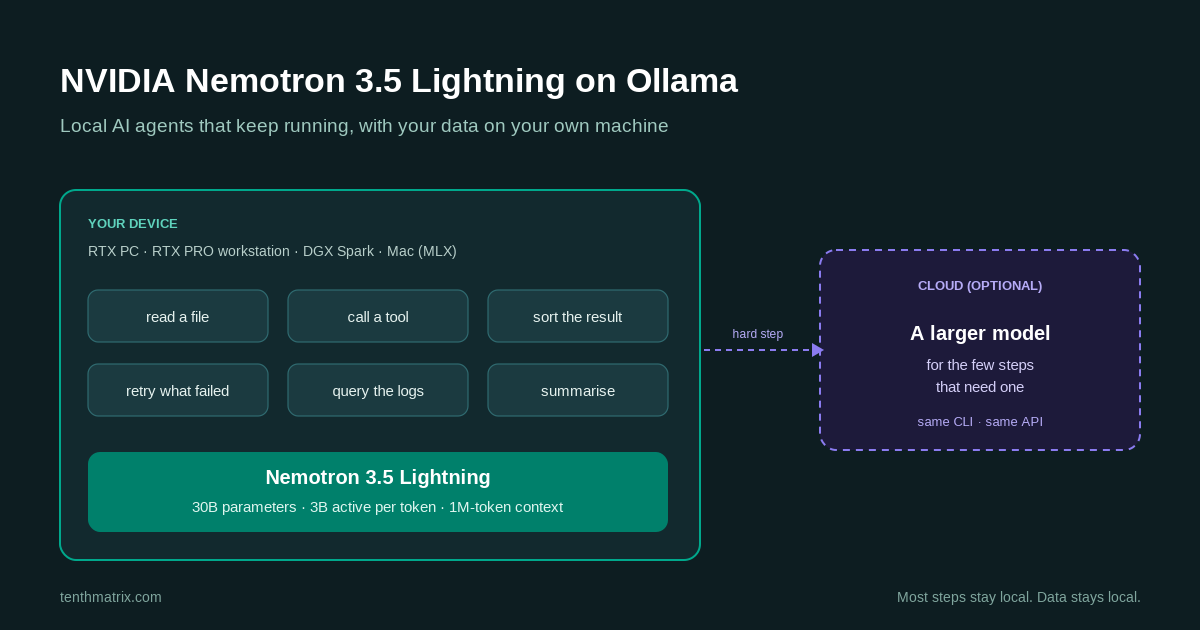
NVIDIA Nemotron 3.5 Lightning is an open 30B mixture-of-experts model with about 3B active parameters per token, a 1M-token context window and training aimed squarely at agent work: tool calls, instruction following and multi-turn tasks. It is now in the Ollama library as nemotron-3.5-lightning. This note is the practical guide: which tag to pull for your hardware, how to size memory and context, how to plug it into Claude Code, OpenCode and your own agent loops, how to get reliable tool calls and structured output, how to route between a local tier and a cloud model, how to serve it to a team safely, and how to measure it on your own workload. For the business view, read the companion blog post.
ollama pull nemotron-3.5-lightning (or :30b-mlx on Apple silicon). Budget 19–25 GB for the default weights plus room for context. Set the context length deliberately (64K is a good start for coding agents; do not default to 1M). Use ollama launch claude|opencode|hermes|openclaw --model nemotron-3.5-lightning for harnesses, the native /api/chat or the OpenAI-compatible /v1 endpoint for your own code. Validate every tool call and every JSON answer, cap retries, and escalate failures to a larger model through the same API. Keep port 11434 on localhost unless you put authentication in front of it.
1. What the model is
| Parameters | 30B total, about 3B active per token (NVIDIA calls it 30B-A3B) |
| Architecture | Hybrid: interleaved Mamba-2 and mixture-of-experts layers with a few attention layers, plus multi-token prediction (MTP) heads |
| Context | Up to 1M tokens (GGUF tags in Ollama); 256K on the MLX tags |
| Input / output | Text in, text out |
| Ollama capabilities | tools, thinking |
| Training | 100B-token MTP warm-up, 1T tokens of distillation from Nemotron 3 Super Base, a 21B-token long-context phase to reach 1M, then supervised fine-tuning and reinforcement learning with verifiable rewards (RLVR) |
| Speculative decoding | MTP, DFlash or DSpark; NVIDIA claims up to 4x the output speed of similar-sized open models |
| Licence | OpenMDW License Agreement 1.1 (commercial use permitted under its terms) |
| Released | 11 August 2026 |
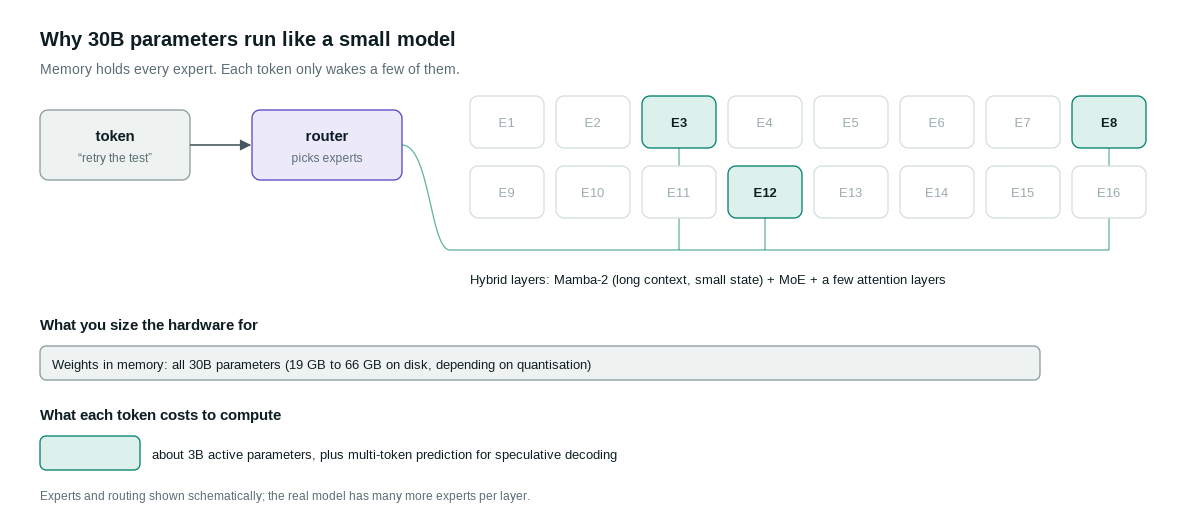
Two properties drive almost every practical decision below:
- MoE: memory scales with 30B, compute with 3B. You must fit all the experts in memory (or spill some to the CPU, which hurts), but each token only runs about 3B parameters. On a GPU that holds the whole model, generation is fast. On a GPU that does not, it can be slower than a dense model that fits.
- Hybrid Mamba: long context is cheaper than usual. Mamba-2 layers carry a fixed-size state rather than a key/value cache that grows with every token. Only the few attention layers build a KV cache, so memory for long contexts grows much more slowly than in a pure transformer of the same size. It still grows, so 1M tokens is not free.
2. Pick the right tag
The Ollama library lists eleven tags. Several are aliases of the same weights (same digest), so there are really six builds:
| Tag(s) | Format | Size | Context | Use when |
|---|---|---|---|---|
latest, 30b, 30b-a3b | Default build | 19–25 GB | 1M | Start here on NVIDIA GPUs, Linux and Windows |
30b-a3b-q4_K_M | GGUF 4-bit | 25 GB | 1M | Pin an explicit quantisation in production |
30b-a3b-q8_0 | GGUF 8-bit | 35 GB | 1M | 48 GB+ GPUs; better fidelity for extraction and code |
30b-a3b-bf16 | GGUF BF16 | 66 GB | 1M | Reference quality, evaluation baselines, DGX-class memory |
30b-mlx, 30b-a3b-mlx, 30b-a3b-nvfp4 | MLX (4-bit) | 19 GB | 256K | Apple silicon with 32 GB+ unified memory |
30b-a3b-mxfp8 | MLX 8-bit | 34 GB | 256K | Apple silicon with 64 GB+ |
30b-a3b-mlx-bf16 | MLX BF16 | 66 GB | 256K | Apple silicon with 96 GB+, evaluation |
Sizes and digests are from the Ollama tags page on 20 November 2026. Tags move; in production, pin the explicit quantisation tag (or the digest) rather than latest, so an upstream re-publish does not change your agent's behaviour under you.
3. Size memory and context
Total memory ≈ weights + context state + runtime overhead. A practical way to plan:
- Weights: the tag size above.
- Context: small for Mamba layers, growing linearly for the attention layers. Measure it rather than guess: load the model at the context you want and read
ollama ps. - Headroom: keep 10–15% free. On a desktop, the display and other apps take graphics memory too.
# Load at a chosen context, then see what it really takes and whether it is all on the GPU
OLLAMA_CONTEXT_LENGTH=65536 ollama serve &     # or set it in the desktop app settings
ollama run nemotron-3.5-lightning "Say ready." >/dev/null
ollama ps
# NAME                          ID            SIZE     PROCESSOR    CONTEXT   UNTIL
# nemotron-3.5-lightning:latest 14b60fc91804  ...      100% GPU     65536     4 minutes from now
If PROCESSOR shows a CPU/GPU split, some layers are running on the CPU. Reduce the context, choose a smaller quantisation or close other GPU users. For MoE models, a split can cost more speed than you expect, because experts are picked per token and the slow ones get hit constantly.
Choose context by workload, not by the maximum:
- Chat and short tool loops: 16K–32K.
- Coding agents in Claude Code or OpenCode: 64K or more (Ollama's own guidance for Claude Code).
- Whole-repository or long-document analysis: 128K–256K, after measuring memory.
- 1M: only on hardware with lots of memory, for genuinely huge inputs, and after checking that retrieval over smaller chunks would not do the job better and faster.
4. Install, run and configure
# 1. Install Ollama from ollama.com/download (macOS, Windows, Linux), then:
ollama pull nemotron-3.5-lightning            # NVIDIA GPU / Linux / Windows
ollama pull nemotron-3.5-lightning:30b-mlx    # Apple silicon

# 2. Chat
ollama run nemotron-3.5-lightning

# 3. Inside the REPL: adjust per session
/set parameter num_ctx 65536
/set think false        # turn off visible reasoning for quick tool steps
/show info              # architecture, context, capabilities, licence
Server-wide settings are environment variables on ollama serve (or the system service):
| Variable | What it does | Suggested for agents |
|---|---|---|
OLLAMA_CONTEXT_LENGTH | Default context when a request does not set num_ctx | 65536 |
OLLAMA_KEEP_ALIVE | How long a model stays loaded after the last request | 24h for always-on agents (avoids reload pauses) |
OLLAMA_NUM_PARALLEL | Concurrent requests per loaded model (each needs its own context memory) | 2–4 on a shared server, after measuring |
OLLAMA_MAX_LOADED_MODELS | How many models can be resident at once | 1 on a single GPU, so Lightning is never evicted |
OLLAMA_HOST | Bind address | Leave as 127.0.0.1:11434 (see §11) |
For a reusable agent profile, bake the settings into a Modelfile so every client gets the same behaviour:
# Modelfile.agent
FROM nemotron-3.5-lightning:30b-a3b-q4_K_M
PARAMETER num_ctx 65536
PARAMETER temperature 0.2
SYSTEM """You are a careful execution agent. Use the tools provided. When a tool fails, read the error and try a different approach at most twice, then report what you tried. Never invent file contents or command output."""
ollama create lightning-agent -f Modelfile.agent
ollama run lightning-agent
Low temperature suits tool calling and extraction. If NVIDIA's model card or the Ollama template recommends different sampling for reasoning mode, follow it for those tasks.
5. Use it inside agent harnesses
ollama launch starts a supported tool already wired to Ollama:
ollama launch claude   --model nemotron-3.5-lightning     # Claude Code
ollama launch opencode --model nemotron-3.5-lightning     # OpenCode
ollama launch hermes   --model nemotron-3.5-lightning     # Hermes Agent
ollama launch openclaw --model nemotron-3.5-lightning     # OpenClaw
Claude Code without launch
Ollama exposes an Anthropic-compatible Messages API, so Claude Code can be pointed at it with three variables. This is useful in scripts, containers and CI:
export ANTHROPIC_BASE_URL=http://localhost:11434
export ANTHROPIC_AUTH_TOKEN=ollama
export ANTHROPIC_API_KEY=""
claude --model nemotron-3.5-lightning
- Claude Code settings files can override shell variables. If it still talks to the wrong endpoint, check
~/.claude/settings.jsonand the project settings, then run/status. - Set the context to 64K or more: Claude Code's system prompt, tools and file reads fill a small window quickly, and a truncated context produces confused tool calls.
- Basic chat, file reads, edits and shell tools work with compatible models. Anthropic-hosted server tools such as web search are not provided by Ollama.
- Features that depend on Anthropic's API (prompt caching prices, specific model aliases) do not apply to the local model.
Lightning as a headless coding sub-agent
The most effective use we have found is not to replace the main coding model, but to give routine jobs to a cheap local worker. Run Claude Code non-interactively with Lightning for a bounded task and capture the result:
ollama launch claude --model nemotron-3.5-lightning --yes -- \
  -p "Run the unit tests. If any fail, list each failing test with the file, the assertion and a one-line likely cause. Do not edit files." \
  > test-triage.md
Your main session (on a larger model) then reads test-triage.md instead of thousands of lines of test output. Keep sub-agent prompts narrow, read-only where possible, and explicit about the output format.
6. Call it from your own code
Native REST API
curl -s http://localhost:11434/api/chat -d '{
  "model": "nemotron-3.5-lightning",
  "messages": [{"role": "user", "content": "Summarise RFC 9110 section 15.5.1 in two sentences."}],
  "think": false,
  "stream": false,
  "options": {"num_ctx": 32768, "temperature": 0.2}
}' | jq -r '.message.content'
think toggles the model's reasoning trace. With "think": true the response carries message.thinking separately from message.content. Turn it on for planning or tricky diagnosis; turn it off for routine tool steps where latency matters more.
OpenAI-compatible endpoint
Most agent frameworks speak the OpenAI Chat Completions format. Point them at /v1:
from openai import OpenAI

client = OpenAI(base_url="http://localhost:11434/v1", api_key="ollama")  # key is required but ignored
resp = client.chat.completions.create(
    model="nemotron-3.5-lightning",
    messages=[{"role": "user", "content": "Give me three names for a log-triage agent."}],
    temperature=0.2,
)
print(resp.choices[0].message.content)
The compatibility layer covers the common surface (messages, tools, streaming, JSON mode). For Ollama-specific options such as think or per-request num_ctx, use the native API or the ollama Python/JavaScript libraries.
7. A reliable tool-calling loop
Small models make more tool-call mistakes than frontier models: wrong argument types, calls to tools that do not exist, loops that repeat the same failing call. The loop below is the shape we use. It validates arguments, returns errors to the model as tool results (so it can correct itself), caps iterations and repeated calls, and reports why it stopped.
import json
import subprocess
from pathlib import Path

from ollama import chat

MODEL = "nemotron-3.5-lightning"
ROOT = Path("/srv/agent-workspace").resolve()   # the only directory the agent may touch


def read_file(path: str) -> str:
    """Read a UTF-8 text file inside the workspace.

    Args:
        path: Path relative to the workspace root.
    """
    p = (ROOT / path).resolve()
    if not p.is_relative_to(ROOT):
        raise ValueError("path is outside the workspace")
    return p.read_text(encoding="utf-8")[:20_000]


def run_tests(selector: str = "") -> str:
    """Run the test suite (optionally one test file or test id) and return the tail of the output.

    Args:
        selector: Optional pytest selector, for example tests/test_api.py::test_login.
    """
    cmd = ["pytest", "-q", "--maxfail=5"] + ([selector] if selector else [])
    out = subprocess.run(cmd, cwd=ROOT, capture_output=True, text=True, timeout=600)
    return f"exit={out.returncode}\n{(out.stdout + out.stderr)[-6000:]}"


TOOLS = {f.__name__: f for f in (read_file, run_tests)}


def run_agent(task: str, max_steps: int = 12) -> dict:
    messages = [
        {"role": "system", "content": "Use tools to gather facts. Stop and answer as soon as you can."},
        {"role": "user", "content": task},
    ]
    seen_calls: dict[str, int] = {}
    for step in range(max_steps):
        resp = chat(model=MODEL, messages=messages, tools=list(TOOLS.values()),
                    think=False, options={"num_ctx": 65536, "temperature": 0.2})
        msg = resp.message
        messages.append(msg)
        if not msg.tool_calls:
            return {"status": "done", "steps": step + 1, "answer": msg.content}
        for call in msg.tool_calls:
            name, args = call.function.name, dict(call.function.arguments or {})
            key = name + json.dumps(args, sort_keys=True)
            seen_calls[key] = seen_calls.get(key, 0) + 1
            if seen_calls[key] > 2:
                return {"status": "loop", "steps": step + 1, "repeated": key}
            fn = TOOLS.get(name)
            try:
                if fn is None:
                    raise KeyError(f"unknown tool {name!r}; available: {sorted(TOOLS)}")
                result = str(fn(**args))
            except Exception as exc:   # hand the error back so the model can correct itself
                result = f"ERROR: {type(exc).__name__}: {exc}"
            messages.append({"role": "tool", "tool_name": name, "content": result})
    return {"status": "max_steps", "steps": max_steps}


if __name__ == "__main__":
    print(run_agent("Run the tests and explain the first failure, citing the file and line."))
Points that matter more with a small model:
- Few, well-described tools. Five clear tools beat twenty overlapping ones. The Python library builds the schema from the type hints and the docstring's
Args:section, so write them carefully. - Return errors, do not raise them. An error string as a tool result lets the model fix its own arguments. An exception kills the run.
- Bound everything. Steps, repeated identical calls, output size per tool result and wall-clock time.
- Restrict side effects in code, not in the prompt. The path check in
read_fileis the control; the system prompt is only a hint. - Treat a non-
donestatus as an escalation signal (see §9).
8. Structured output you can trust
For extraction and classification, constrain the output with a JSON Schema through Ollama's format field and validate it on the way out:
from typing import Literal

from ollama import chat
from pydantic import BaseModel, Field, ValidationError


class Triage(BaseModel):
    severity: Literal["low", "medium", "high", "critical"]
    category: Literal["auth", "malware", "network", "data-exfiltration", "misconfiguration", "other"]
    affected_hosts: list[str] = Field(default_factory=list)
    summary: str = Field(max_length=400)
    needs_human: bool


def triage(alert_text: str) -> Triage | None:
    for attempt in range(2):
        resp = chat(
            model="nemotron-3.5-lightning",
            messages=[
                {"role": "system", "content": "Classify the security alert. Use only facts present in the alert."},
                {"role": "user", "content": alert_text},
            ],
            format=Triage.model_json_schema(),
            think=False,
            options={"temperature": 0},
        )
        try:
            return Triage.model_validate_json(resp.message.content)
        except ValidationError:
            continue
    return None   # caller escalates to a larger model or a human
The schema constrains decoding so the output parses; it does not make the content correct. Add domain checks after validation: do the affected_hosts actually appear in the alert, does the invoice total equal the sum of its lines, does the date fall in the right period. Those checks are cheap and catch most of the errors a small model makes.
9. A local tier with cloud escalation
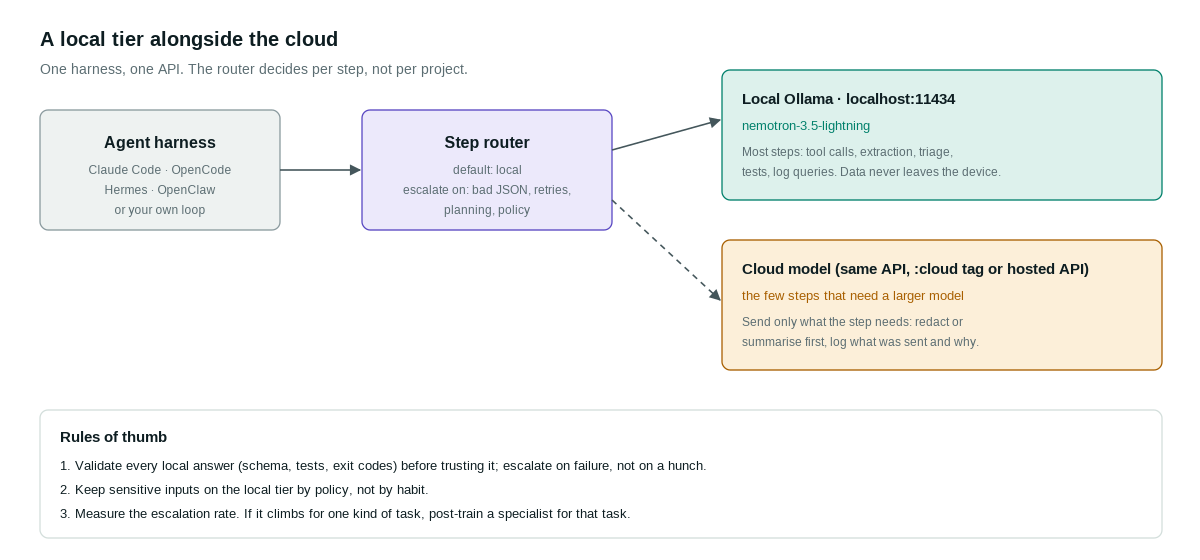
Because Ollama's cloud models use the same API as local ones, a router is a small amount of code. The rules: default to local, escalate on evidence (failed validation, loop detection, a task class you have marked as hard), never escalate data your policy says must stay local, and log every escalation.
import logging
import os
from dataclasses import dataclass

from ollama import Client

log = logging.getLogger("router")

LOCAL = Client(host="http://127.0.0.1:11434")
CLOUD = Client(host="https://ollama.com",
               headers={"Authorization": "Bearer " + os.environ["OLLAMA_API_KEY"]})

LOCAL_MODEL = "nemotron-3.5-lightning"
CLOUD_MODEL = os.environ.get("CLOUD_MODEL", "")   # a larger :cloud model you have chosen and tested

HARD_TASKS = {"plan", "architecture", "root-cause"}


@dataclass
class Step:
    kind: str                 # "extract", "tool", "plan", ...
    messages: list
    sensitive: bool = False   # set by policy from the data source, never by the model


def run_step(step: Step, validate) -> tuple[str, str]:
    """Return (tier, content). validate(content) -> bool decides whether to accept the local answer."""
    if step.kind not in HARD_TASKS or step.sensitive:
        out = LOCAL.chat(model=LOCAL_MODEL, messages=step.messages, think=False).message.content
        if validate(out):
            return "local", out
        if step.sensitive:
            log.warning("local answer failed validation; sensitive step kept local, sent to review")
            return "review", out
    if not CLOUD_MODEL:
        return "review", ""
    log.info("escalating step kind=%s to %s", step.kind, CLOUD_MODEL)
    out = CLOUD.chat(model=CLOUD_MODEL, messages=step.messages).message.content
    return "cloud", out
Track the escalation rate per step kind. If one kind escalates often, you have three options, in order of effort: improve its prompt and tools, give it more context, or post-train Lightning on examples of that task (§13). If you use a hosted API other than Ollama's cloud for the larger model (for example the Claude API), the router is the same; only the cloud client changes.
10. Serve it to a team
For a shared agent server on a workstation or a DGX Spark, run Ollama in a container with the GPU attached and the API bound to localhost, then put an authenticating proxy in front:
# compose.yaml
services:
  ollama:
    image: ollama/ollama:latest          # pin a version tag in production
    restart: unless-stopped
    ports:
      - "127.0.0.1:11434:11434"          # never 0.0.0.0 without auth in front
    environment:
      OLLAMA_CONTEXT_LENGTH: "65536"
      OLLAMA_KEEP_ALIVE: "24h"
      OLLAMA_NUM_PARALLEL: "2"
      OLLAMA_MAX_LOADED_MODELS: "1"
    volumes:
      - ollama:/root/.ollama
    deploy:
      resources:
        reservations:
          devices:
            - driver: nvidia
              count: all
              capabilities: [gpu]
volumes:
  ollama:
docker compose up -d
docker compose exec ollama ollama pull nemotron-3.5-lightning:30b-a3b-q4_K_M
docker compose exec ollama ollama ps
- Concurrency costs memory. Each parallel slot holds its own context. Raise
OLLAMA_NUM_PARALLELonly whileollama psstill shows 100% GPU. - Authentication. Ollama's local API has no user authentication. Put a reverse proxy with per-user or per-agent API keys, TLS and rate limits in front of it (we use Proxy10x for this), and reach it over a private network such as WireGuard rather than the open internet.
- Monitoring. Log request counts, latency, tokens per second and escalation rates per agent. A sudden fall in tokens per second usually means the model has partly moved to the CPU.
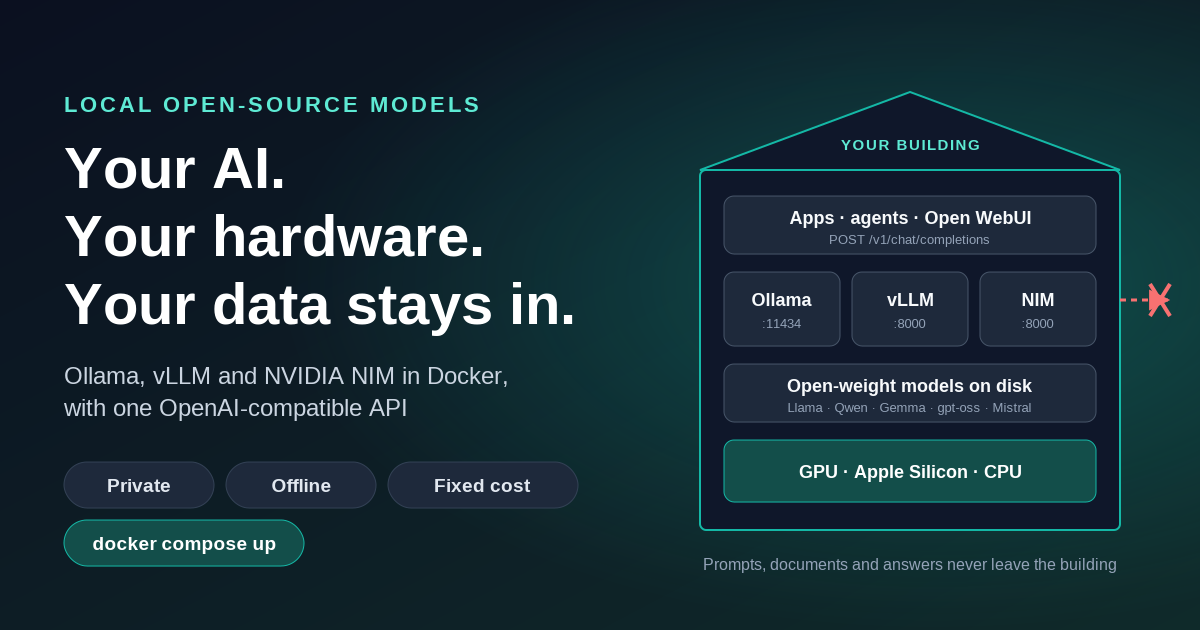
- Higher throughput. When one box serves many concurrent agents, a batching server such as vLLM, or NVIDIA NIM, will generally out-scale Ollama. Our guide to local LLMs with Docker, Ollama, vLLM and NVIDIA NIM compares them.
11. Security: local is private, not safe
Running the model locally removes one risk (your data going to a model provider) and leaves the others:
- Prompt injection. An agent that reads email, web pages or tickets can be instructed by them. Smaller models are, if anything, easier to steer. Treat all tool output as untrusted.
- Over-broad tools. Give agents the narrowest tools that do the job: a read-only log query, not a shell; a single-directory file reader, not the home folder.
- Sandbox the agent process. Run agents in a sandbox with filesystem, network and credential policies enforced outside the model. Our OpenShell developer guide shows how, including routing inference to a local model.
- Exposed port 11434. Scanners look for open Ollama servers. If
OLLAMA_HOST=0.0.0.0is set on a machine with a public address, anyone can use your GPU and pull or delete models. Bind to localhost and use a proxy. - Model provenance. Pull from the official library name, pin the digest in production, and record which digest each agent version was tested with.
- Secrets. Do not put API keys or passwords in prompts or tool results. Inject them into tools at execution time from a secrets manager.
12. Measure it on your own work
Vendor benchmarks tell you whether to try a model; only your tasks tell you whether to adopt it. Ollama returns timing data with every non-streamed response (durations are in nanoseconds), which is enough for a quick speed check:
import statistics

from ollama import chat

PROMPTS = [
    "List the HTTP status codes a REST API should return for validation errors and why.",
    "Write a Python function that parses ISO 8601 durations, with tests.",
    "Explain what a Mamba state-space layer does in 5 sentences.",
]


def bench(model: str, runs: int = 3, num_ctx: int = 32768) -> None:
    gen, pre = [], []
    for prompt in PROMPTS:
        for _ in range(runs):
            r = chat(model=model, messages=[{"role": "user", "content": prompt}],
                     think=False, options={"num_ctx": num_ctx, "temperature": 0})
            gen.append(r.eval_count / (r.eval_duration / 1e9))
            pre.append(r.prompt_eval_count / max(r.prompt_eval_duration / 1e9, 1e-9))
    print(f"{model}: generation {statistics.median(gen):.0f} tok/s (median), "
          f"prompt processing {statistics.median(pre):.0f} tok/s")


bench("nemotron-3.5-lightning")
Speed is the easy part. For adoption, build a small task suite from real work (20–50 cases per step kind: extract these fields, classify this alert, find the failing test) with a checker for each, and record pass rate, median steps, escalation rate and wall-clock time for Lightning, for your current cloud model and for the routed combination. Re-run it whenever you change the tag, the prompt or the tools.
13. Post-train a specialist
Lightning's weights, recipes and much of its training data are open, and NVIDIA positions it for post-training with NVIDIA NeMo on your own domain data, tools, workflows and policies. A typical path:
- Collect examples from your router logs: the steps that escalated, with the larger model's accepted answer as the target. Remove personal and secret data.
- Fine-tune (for example with LoRA) on the BF16 checkpoint using NeMo or another framework that supports the hybrid Mamba-MoE architecture. Check support before you start; not every fine-tuning tool handles Mamba layers.
- Evaluate on the task suite from §12, against the base model and the cloud model.
- Package for Ollama: export or convert the result to a format Ollama can import for this architecture, then
ollama createit from a Modelfile with the same template and parameters as the base model. Keep the base model as a fallback.
Read the OpenMDW 1.1 licence before distributing a derived model.
14. Gotchas
- Context silently too small. If
num_ctxis lower than the conversation, older content is dropped and the agent "forgets" its instructions. Set it explicitly per agent. - Context silently too large. A large default context on a small GPU pushes layers to the CPU. Check
ollama psafter every config change. - MLX tags stop at 256K. If a workflow needs more on a Mac, chunk and retrieve instead.
- Thinking on everywhere. Reasoning traces add tokens and latency to every step. Enable
thinkfor planning and diagnosis only. - First call is slow. Loading 19+ GB takes time. Use
OLLAMA_KEEP_ALIVEor send a warm-up request when the agent starts. - Harness assumptions. Tools built for frontier models may send very long system prompts or many tools. Trim them for the local tier where the harness allows.
- Unpinned tags.
latestcan change. Pin the quantisation tag or digest for anything you test and ship. - Vendor speed figures. "Up to 4x" depends on hardware, batch size and decoding method. Measure your own.
Sources
- Ollama: model page and tags for
nemotron-3.5-lightning, Claude Code integration and tool-calling documentation (read 20 November 2026). - NVIDIA: Nemotron 3.5 Lightning 30B-A3B model card (build.nvidia.com), the Nemotron 3.5 Super and Lightning research page and technical report, and NVIDIA's launch announcement of 11 August 2026.
- OpenMDW License Agreement 1.1.
Code samples follow the documented Ollama APIs and Python library; adapt paths, timeouts and model tags to your environment and test them before production use. Nemotron, RTX, DGX and NeMo are trademarks of NVIDIA. TenthMatrix is not affiliated with NVIDIA or Ollama.